
MYNT: Material You New Tab
MYNT: Material You New Tab is a versatile browser extension that personalizes your New Tab page with customizable themes, a welcoming message, and various handy tools, all while integrating seamlessly with your preferred search engine.






 ▪️
▪️ 

 ▪️
▪️ 


Features •
Installation Guide •
Download •
Currently Supported Languages
Contributing •
Star History •
Issues and Support •
Privacy Policy •
License
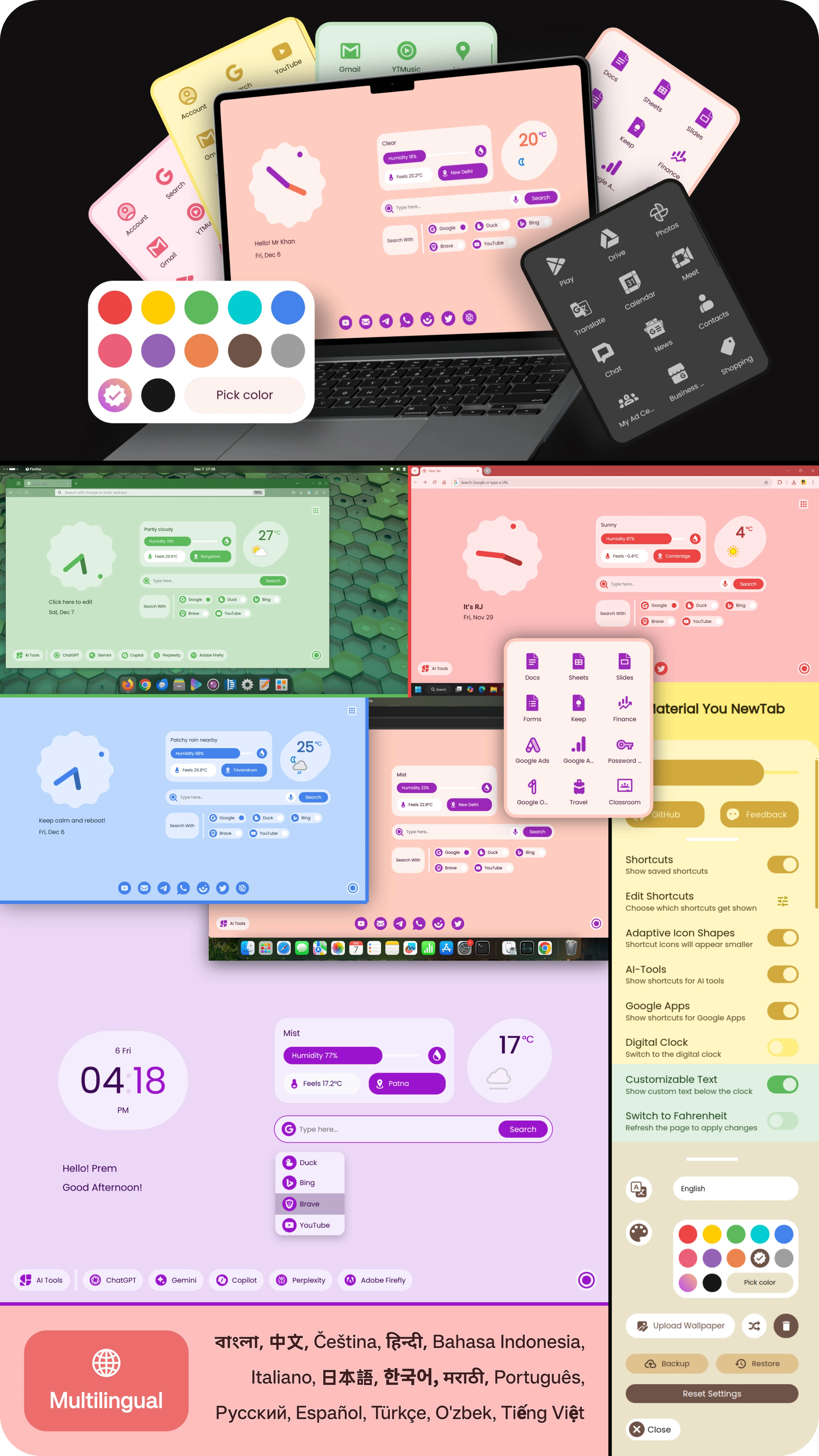
🔴 🟡 🟢 Test live: https://prem-k-r.github.io/MaterialYouNewTab/
✨ Features
- Integrated Search: Search directly from the New Tab using your preferred search engine — Google, DuckDuckGo, Bing, Brave Search, YouTube, Wikipedia, and more, with integrated voice typing.
- Customizable Themes: Choose from a selection of themes or use the built-in color picker to match your style.
- Wallpaper: Upload your own wallpapers or enable daily random images sourced from Lorem Picsum.
- Personalized Greeting: Add a custom message or your name, so you're greeted each time you open a new tab.
- Clock & Time Display: Choose between a modern analog or digital clock.
- Live Weather Updates: View real-time temperature, conditions, humidity, feels like, and max-min temperature values. Supports °C and °F with location customization.
- Quick Shortcuts: Access common platforms (YouTube, Email, WhatsApp, etc.) or add your own shortcuts for instant navigation.
- AI Tools: Open ChatGPT, Gemini, Copilot, Perplexity, Claude, DeepSeek, and more with one click.
- To-Do List: Manage daily tasks, pin important ones, and enjoy automatic cleanup at the start of each day (pinned tasks reset to pending).
- Sidebar Bookmarks: View, delete, and organize bookmarks in either list or grid layout.
- Google Apps: Quickly launch Gmail, Drive, Docs, and other Google services.
- Backup & Reset: Save or restore your setup anytime, or reset everything to default with one click.
- Language Support: Use the extension in your preferred language for better accessibility.
- Browser Compatibility: Supports all Chromium-based browsers, including Chrome, Edge, Brave, and Opera, as well as Firefox-based browsers like Firefox and Zen.
📥 Installation Guide
Download
-
Development Version (v3.3.*)
-
Clone the Repository: Use the following command to clone the repository:
git clone https://github.com/prem-k-r/MaterialYouNewTab.git -
Alternatively, download the latest version as a ZIP file by clicking below:

-
You can also download the ZIP file by clicking on the Code button. On the repository page, look for a green button labeled Code. Click on the Code button, and in the dropdown menu, select Download ZIP.
-
-
Stable Release (v3.3)

Installation
 Chromium-Based Browsers
-
Install from Chrome Web Store or Microsoft Edge Add-ons:
Or follow the manual steps below:
-
Manual Installation:
-
Prepare the Extension Folder:
- Ensure you’ve cloned the repository or downloaded the ZIP file and extracted it.
-
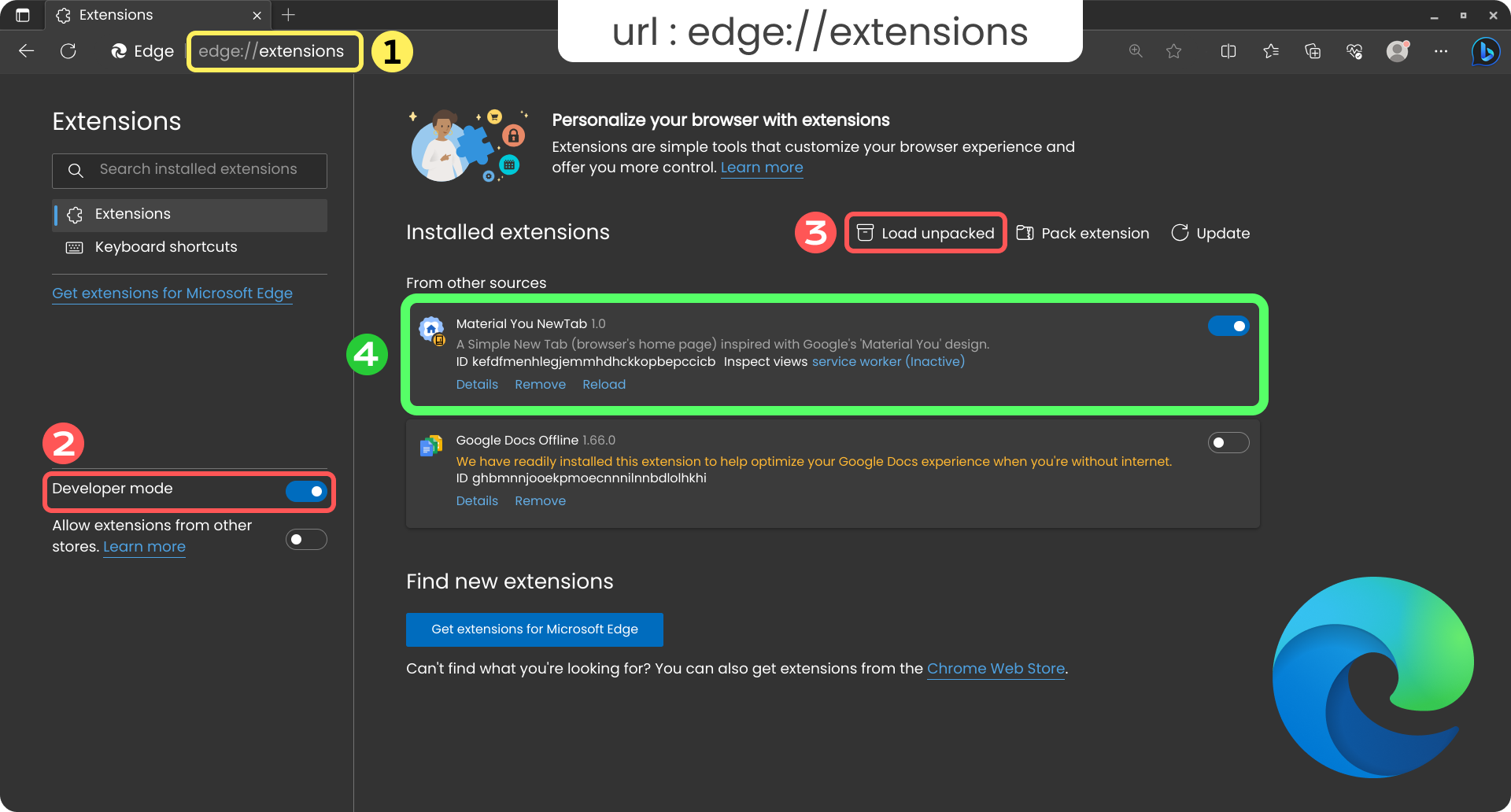
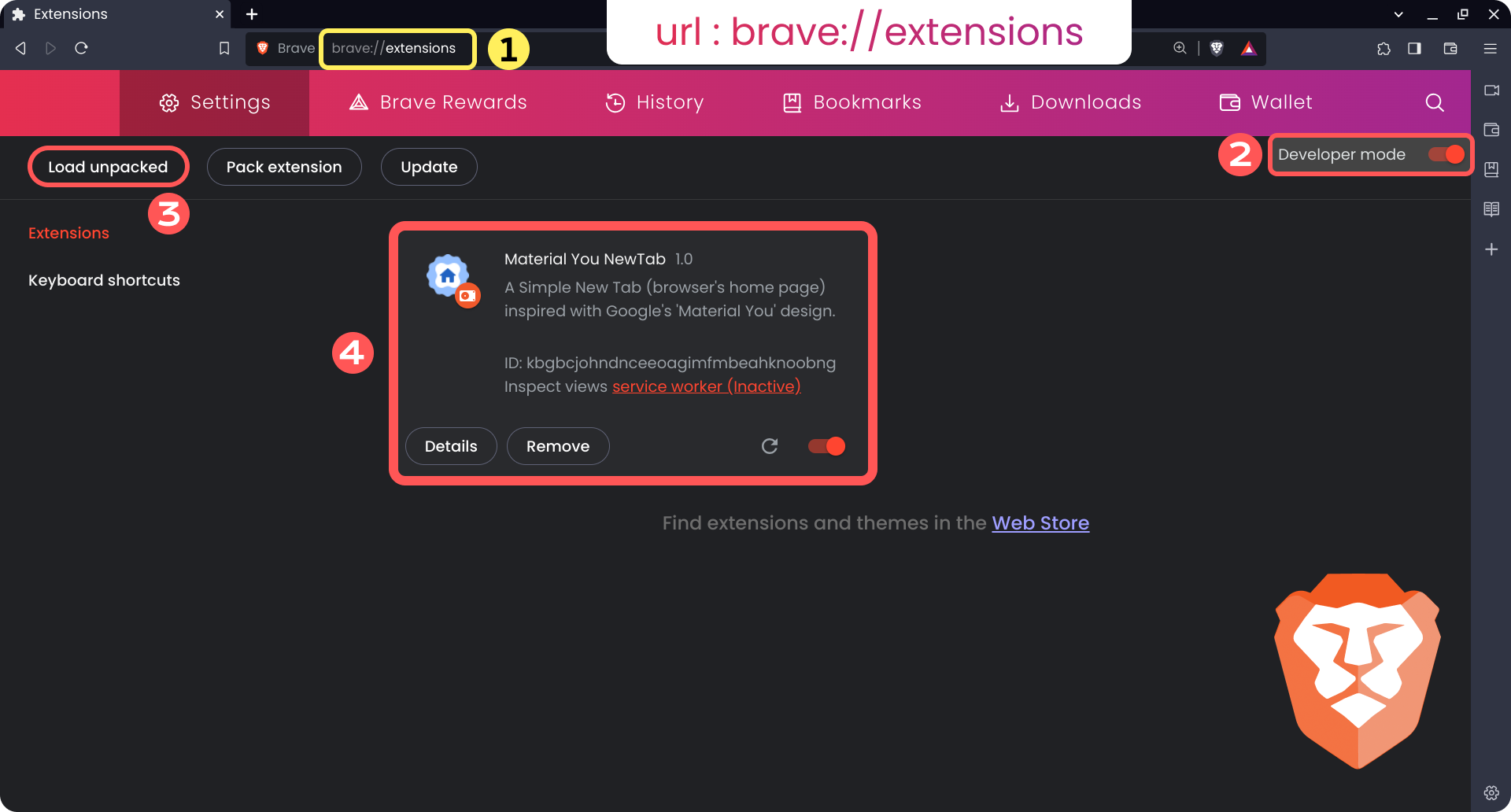
Open Extensions Page: Open your preferred browser and enter the following text in the address bar:
-
 Chrome:
 chrome://extensions -
Edge:
edge://extensions -
 Brave:
 brave://extensions -
 Opera:
 opera://extensions
-
-
Enable Developer Mode:
- Turn on Developer Mode in the extensions page.
-
Load Unpacked Extension:
- Click on Load unpacked and select your extracted extension folder.
-
-
Additional Steps ONLY for
Opera (or
Opera GX):
[!NOTE] Opera does not support replacing the default New Tab.
This method only sets the extension as a startup page.
Click here for the workaround
- Go to the Settings.
- Scroll to the On startup section (use the search option if needed).
- Click on Open a specific page or set of pages and then click on Add a new page.
- Add the following (replace 32-character extension ID if installed manually) to the Site URL:
chrome-extension://jjpokbgpiljgndebfoljdeihhkpcpfgl/index.html
-
To find the extension ID:
- Go to
opera://extensions, find the extension, and copy the 32-character ID from its details.
- Go to
-
To simulate new tabs:
-
Bookmark the extension page to access new tab pages manually.
-
Or, right-click the tab and select Duplicate tab.
-
Below are screenshots of the process to guide you through each step visually.

 Firefox
-
Install from Firefox Add-ons
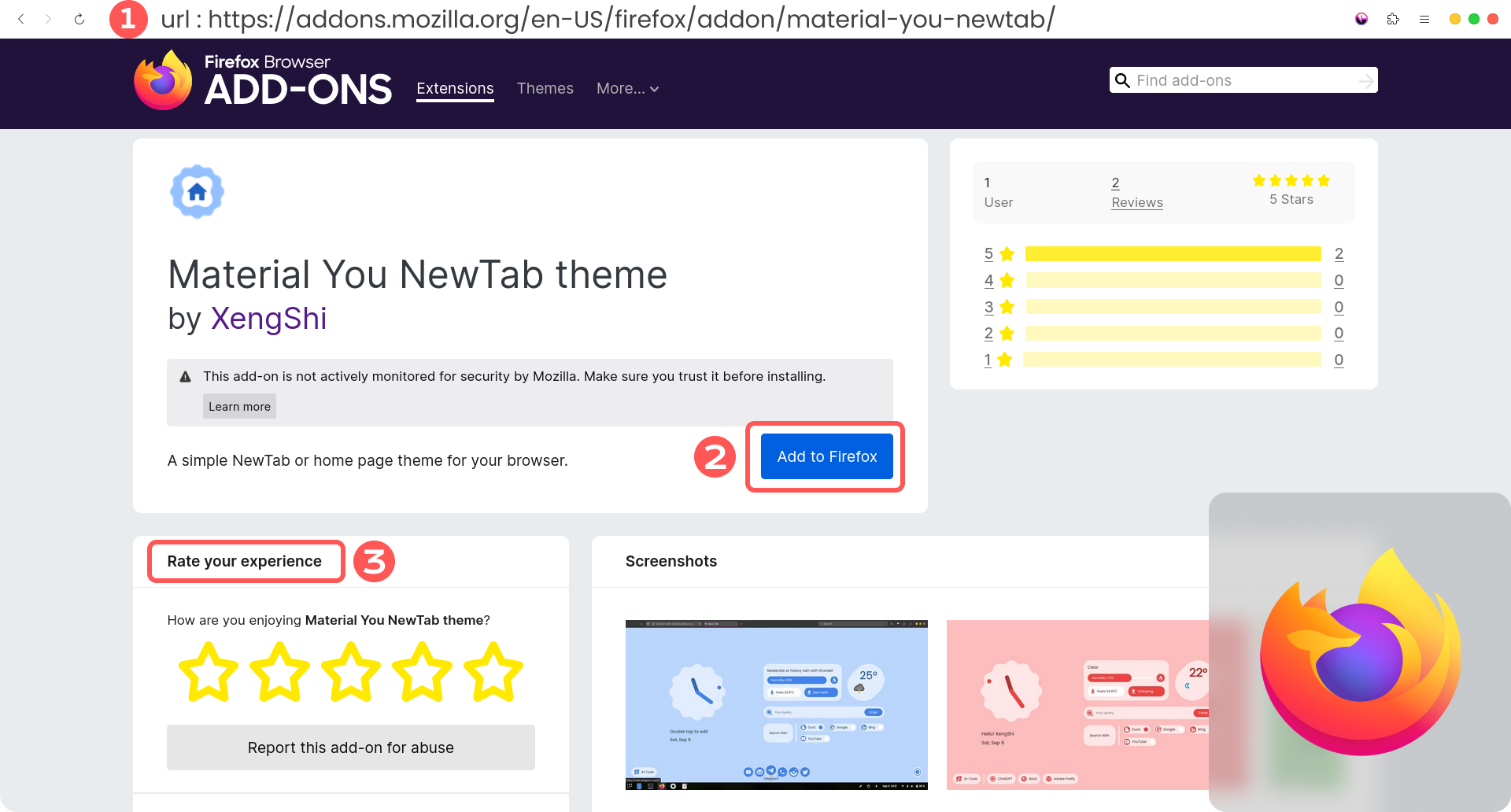
-
Update the Homepage:
-
Open Firefox and obtain the UUID:
- Hover over the New Tab button (next to the tab close button). A tooltip will display the extension's unique ID, which looks like this:
0f31e1c1-d63c-4660-b950-8bfbda3bb20a. Copy or note this ID. - Alternatively, type
about:debugging#/runtime/this-firefoxin the address bar and find the extension's UUID there.
- Hover over the New Tab button (next to the tab close button). A tooltip will display the extension's unique ID, which looks like this:
-
Open Settings and navigate to Home, or type
about:preferences#homein the address bar. -
Under the Homepage and new windows section, select Custom URLs....
-
Paste the following URL, replacing the ID with your actual UUID:
moz-extension://e31d6701-f699-414f-bb4c-8fde495c432e/index.html -
This will update both your homepage and new tab to the extension.
-
-
Additional Steps ONLY for Zen Browser
:
-
Open a new tab and go to
about:config. -
Accept the risk and continue if prompted.
-
In the search bar, type:
zen.urlbar.replace-newtab -
Set its value to false by clicking the toggle icon.
This ensures the browser does not override the custom New Tab page set by the extension.
-
-
Manual Installation (Temporary):
-
Clone the repository or download and extract the ZIP file.
-
Prepare the Manifest:
- Delete the existing
manifest.jsonfile. - Rename
manifest(firefox).jsontomanifest.json.
- Delete the existing
-
Load Temporary Add-on:
- Go to
about:debugging#/runtime/this-firefox, select "This Firefox", then click Load Temporary Add-on. - Browse and select the updated
manifest.json.
- Go to
-
🌐 Currently Supported Languages (32)
| Language | Code | Translator(s) |
|---|---|---|
 English English |
en | XengShi, Prem |
 Arabic - العربية Arabic - العربية |
ar-SA | Mazen |
 Azerbaijani - Azərbaycanca Azerbaijani - Azərbaycanca |
az | Hasan Bakhtiar |
 Bangla - বাংলা Bangla - বাংলা |
bn | It'z RJ, Prem |
 Chinese (Simplified) - 简体中文 Chinese (Simplified) - 简体中文 |
zh-CN | Guy Berryman, Tianli, Konsento, HdShare |
 Chinese (Traditional) - 繁體中文 Chinese (Traditional) - 繁體中文 |
zh-TW | C. Y. Tseng |
 Czech - Čeština Czech - Čeština |
cz | Michal Šmahel |
 French - Français French - Français |
fr | 422.io |
 German - Deutsch German - Deutsch |
de | Prem |
 Greek - Ελληνικά Greek - Ελληνικά |
el | Lefteris T. |
 Hindi - हिंदी Hindi - हिंदी |
hi | XengShi, Prem |
 Hungarian - Magyar Hungarian - Magyar |
hu | Zan1456, smurf11k |
 Indonesian - Bahasa Indonesia Indonesian - Bahasa Indonesia |
idn | Ayyas-RF |
 Italian - Italiano Italian - Italiano |
it | Claudio Di Maio |
 Japanese - 日本語 Japanese - 日本語 |
ja | XengShi, S-H-Y-A, Konsento |
 Korean - 한국어 Korean - 한국어 |
ko | XengShi, eunsunglee0524 |
| Marathi - मराठी |
mr | Prem, Pratik Lokhande, Anand Naik Gaonkar |
 Nepali - नेपाली Nepali - नेपाली |
ne | Bikash Shresha |
 Persian - فارسی Persian - فارسی |
fa | AMIRHOSSEIN |
 Polish - Polski Polish - Polski |
pl | Dawid Warkowski |
 Portuguese - Português Portuguese - Português |
pt-BR | Maycon Vitor Correa |
 Russian - Русский Russian - Русский |
ru | giwi, CodWiz |
 Slovenian - Slovenščina Slovenian - Slovenščina |
sl-SI | Linux-Alex |
 Spanish - Español Spanish - Español |
es-ES | XengShi, Isaac Vergara, Saúl Palacios |
 Swedish - Svenska Swedish - Svenska |
sv | HELLOEMPO |
| Tamil - தமிழ் |
ta | தமிழ்நேரம் |
 Thai - ภาษาไทย Thai - ภาษาไทย |
th | Prin |
 Turkish - Türkçe Turkish - Türkçe |
tr | Nobody, Kerim Ölçer |
 Ukrainian - Українська Ukrainian - Українська |
uk | Serhii Lozytskyi, smurf11k |
 Urdu - اردو Urdu - اردو |
ur | Asfandiyar Khan |
 Uzbek - O'zbek Uzbek - O'zbek |
uz | Firdavs, S0ME2 |
 Vietnamese - Tiếng Việt Vietnamese - Tiếng Việt |
vn | Diep, Tuan |
Check the Translation Status Page for an overview of completed languages and missing strings analysis.
If you'd like to contribute quotes in any of the languages used in MYNT, check out Multilingual Quotes.
🤝 Contributing
Contributions are welcome! If you’d like to contribute:
- Follow the guidelines in the CONTRIBUTING.md file.
- Fork the repository.
- Create a new branch:
git checkout -b feature/YourFeature. - Commit your changes:
git commit -m 'Add Your Feature'. - Push to the branch:
git push origin feature/YourFeature. - Open a pull request.
⭐ Star History
Here is the star history chart for the MYNT: Material You New Tab repository. It shows the growth of stars over time, reflecting the increasing interest and support for the project.
❓ Issues and Support
- If you encounter any issues or bugs, feel free to open an issue on GitHub.
- For general questions or support, you can contact the repository maintainers through the Telegram group: Join here.
🛡 Privacy Policy
MYNT: Material You New Tab prioritizes your privacy and is focused solely on providing a better browsing experience. We make the following commitments:
- No commercialization — absolutely no ads, paid features, or premium tiers
- No trackers — no data collection, analytics, or background reporting of any kind
- No access to personal information — all settings, cache, and preferences are stored locally in your browser
For more details, read our Privacy Policy.
📜 License
Copyright (C) 2024-2026 Prem Kumar
Copyright (C) 2023-2025 XengShi
This extension is the continuation of XengShi's Material You NewTab (Learn more).
This project is licensed under the GNU General Public License v3.0 (GPL-3.0). This means you must not distribute this software, whether original or modified, to any platform without its source code or the reference to its original source code. See the LICENSE file for details.


