
SOTA Engineering Skills




Make your AI coding assistant build and audit like your most senior engineer.
Your assistant is brilliant — it just doesn't know your standards, and it forgets the ones it does know as the task grows long. SOTA-skills fixes both, and the fix is measured: from a bare "build X" prompt, best-practice coverage climbs from ~59% to ~98% (+0.39) — the model stops silently dropping tests, rate limiting, structured logging, and TLS (see every number →).
It works by being a loop, not a prompt dump: route in only the rules a task needs,
re-state them every turn, and re-check them last before shipping — so the guidance
survives a long context instead of fading into it. That's why it beats a bigger prompt
instead of becoming one. Native on Claude Code; works with Gemini CLI, Codex, and any
agent that reads AGENTS.md.
Under the hood: 41 skills (298 files, ~62k lines) of state-of-the-art 2026
practice, each instruction file under 500 lines so only the matching rules load —
the cap applies to skills/** alone, never to README/CHANGELOG/docs/ — every fast-moving
claim web-verified against a primary source.
Two commands to install:
/plugin marketplace add martinholovsky/SOTA-skills
/plugin install sota-skills@sota-skills
Or clone + link (best if you want a local checkout to read, hack on, or pin).
Skills are discovered from .claude/skills/ (per project) or ~/.claude/skills/
(personal, all projects). Clone the repo, then run the installer — it symlinks
every skill (and your profile, if you have one):
git clone https://github.com/martinholovsky/SOTA-skills && cd SOTA-skills
./scripts/install.sh                 # personal: ~/.claude/skills (all projects)
./scripts/install.sh --project DIR   # one project: DIR/.claude/skills
./scripts/install.sh --copy          # copy instead of symlink (pin a snapshot)
The installer colour-codes what it did (✓ done · ↻ changed or act on this ·
· no-op) and drops to plain ASCII when the output is not a terminal, on a
non-UTF-8 locale, on TERM=dumb, or with NO_COLOR set — --color=always|never|auto
(or --no-color) overrides the detection either way.
Then describe the task in plain language — routing loads the right skills; the stack comes from your profile or the skills' defaults (naming one is optional):
Design a multi-tenant invoicing service.
Run a full audit of this repo — severity, effort, and fix on every finding.
More install options: Installation · more prompts: Using it.
Contents
- Standards & practices baked in · What the audit hunts that a scanner can't · How the numbers are kept honest
- Skills · Coverage & non-goals
- Installation · Always-on routing · Updating
- Using it
- Optional setup & integrations — badge, gates, other agents, status line, plugin extras
- Structure · How it works · Conventions
- Found a gap? Tell us · Contributing · License
Deeper docs: Find it fast (docs index) · Does it work? (measured results) · Why it works · Keeping rules applied as context fills · Roadmap
Standards & practices baked in
Findings name the control they violate — not just "this looks wrong":
- Security — OWASP Top 10 (2025), ASVS, API & LLM Top 10; findings cite CWE IDs
- Languages — all 9 language skills (Rust → Ruby, below) get the same rigor; formal standards where they exist: SEI CERT (C, C++, Java), MISRA C/C++, ANSSI Rust
- Supply chain — SLSA, Sigstore, in-toto, SBOM (CycloneDX/SPDX), NIST SSDF
- Cloud & identity — CIS Benchmarks, NIST 800-207 zero trust, NIST 800-63-4, OAuth 2.1, FAPI 2.0, passkeys, SPIFFE
- Privacy & compliance — GDPR, CCPA/CPRA, HIPAA, PCI DSS 4.x, SOC 2, ISO 27001, EU AI Act, NIS2, DORA
- Government & regulated — NIST CSF 2.0, 800-53, 800-171/CMMC, FedRAMP, EU Cyber Resilience Act, IEC 62443
- Threats, detection & AI/ML — STRIDE, LINDDUN, MITRE ATT&CK & ATLAS, NIST 800-61, NIST AI RMF
- Frontend, mobile & testing — WCAG 2.2 AA, Core Web Vitals, OWASP MASVS & WSTG
Named standards are the floor. Most of the library is the practice layer no regulation writes down: cancellation & backpressure, retries with jitter, circuit breakers, outbox/saga, zero-downtime migrations, measure-first performance, API evolvability, per-language idioms, SLOs, test-suite health.
Measured, not asserted — library vs. an unguided model (same model, no library); clean, blind-judged, stable across samples (results & method →):
- Completeness +0.39 — from a bare "build X" prompt, best-practice coverage goes ~59% → ~98% (7 tasks): the model stops silently dropping tests, rate limiting, structured logging, and TLS. Web search likely can't recover this (an agent won't search "should I add rate limiting"). Not model-specific: a different-family frontier model (
openai/gpt-5.1) shows +0.44 on the same tasks (cross-model →). - Freshness +0.53 — current-2026 facts (RFCs, CVEs, EOLs) 0.44 → 0.97, where an unguided model is confidently wrong.
- Routing +0.10 — the right skills load for the task (0.90 → 1.00), even ones a keyword read misses; with the library, results barely move run-to-run.
And not just vs. an unguided model — head-to-head against the most popular guidance libraries on backend build tasks, SOTA-skills leads on completeness (content-only, blind-judged; wins or ties all 21 cases, loses none):

A five-domain breadth test shows when this edge holds: SOTA-skills leads the field wherever a base model ships incomplete code — production backend in any language and complex/security-sensitive frontend (~+10 pts) — and ties where the base model is already near-complete (simple UI, templated infra). The lead tracks task difficulty, not the domain — we measure it and say so. Full breadth result, consolidated table, method & honest limits →
What the audit hunts that a scanner can't
Eight classes of defect survive every linter, SAST rule, and CVE scanner, because in each one the code isn't wrong. The library hunts them as explicit passes:
- Controls that are inert — a safeguard whose success and whose total failure look
identical from outside: a swallowed enforcement exception, a ruleset that loads zero
rules, presence decided by
exists()rather than a loaded artifact, a CI gate whose every run is skipped (and on GitHub a skipped job reports Success to branch protection), a policy engine left inAudit/warn/report-only since the day it shipped, a report whose word "verified" traces to no line that can fail, a test that still passes when the control's body is replaced with a no-op. (rules/10) - Layers that were never layers — the same test applied to an architecture diagram rather than a function. A second-opinion classifier drawn from the same model family as the system it guards shares its blind spots by construction (common-cause failure), and one that only ever sees what the primary already flagged uncertain cannot, even in principle, catch what the primary got confidently wrong. A TEE bought to fix records that were never emitted is answering a liveness question no hardware guarantee covers. Both are counted in a threat model and neither reaches the case it is counted for. (rules/08 §1, rules/04 §8)
- Stages that report success while doing nothing — found by the cheap signals
rather than by reading every line: a step returning "nothing found" far faster
than its claimed work allows, a gate that never prints how many items it
examined (
0 checked, 0 failed, exit 0), a size-gated branch no fixture crosses, a cache key narrower than the behaviour it gates, a control written as anassertthat-O/NDEBUG/a missing-eadeletes in production. When a tool's correct output cannot be stated at all — the test oracle problem, which is why "it found 0" goes unchallenged — a metamorphic check pins how the output must change: a fixture with N known items, and an assertion that the count moves when the input does. (rules/11) - Your own scorer, gate or benchmark doing none of the above — a whole file turns the lens around: anything whose output decides whether something is OK is a control too. A broken feature produces a complaint; a broken instrument produces a number, and numbers get quoted. So give it a known-bad input it must fail and a known-good one it must pass, bound what it reads, and never trust a number from an instrument you haven't watched produce a wrong answer on purpose. The sharpest case is a guard that is an instance of what it guards — a coverage test whose scope is narrower than the population and whose predicate the defect satisfies, so it passes on exactly what it exists to catch. The remedy every mature discipline reached independently — the proof test, the clinical positive control, aviation built-in test, adversary emulation — is one move: a negative control, a committed known-bad the gate must reject on every run, verified per target rather than once, because a tripwire that fires for 2 of 20 targets looks identical to full coverage. Worth knowing that no mainstream framework asks for this: NIST SSDF and the EU CRA require a record that a scan ran, OpenSSF Scorecard's SAST check detects only that a tool is configured, and SLSA will sign provenance for a scanner set to scan zero files. A passing compliance check is evidence of process, not of protection. (rules/12, devsecops rules/05)
- Dependencies declared but never reached — packages, modules, and plugins wired in and inert. Proven by deleting them in a scratch copy and running the real build, lint, and full suite, with exit codes and before/after transitive counts reported — a grep is not proof. (rules/03 §3.9)
- Decisions that stopped being right — the datastore picked for scale that never arrived, the rewrite justified by a benchmark that no longer reproduces. Every expensive-to-reverse decision is classified JUSTIFIED / STALE / UNJUSTIFIED / UNVERIFIABLE, and any number one rests on is re-measured this session.
- Findings that don't survive contact — every Critical/High gets an independent pass prompted to kill it, working from the code rather than the write-up and defaulting to REFUTED when the evidence is ambiguous. Refutations are recorded, so the next auditor doesn't re-raise them.
- Absence claims — "no hardcoded secrets remain" is the one finding nobody can falsify: a narrow search and a true absence produce identical output. Any absence claim needs a widened search plus a second independent method, with the search stated. (methodology §5, §7)
Where this is not backed by a number: the measured lift is in BUILD (completeness, freshness). Seven audit instruments across three designs all sit at +0.00 — recognition (snippets, cross-file repo, precision), procedure (does the model actually mutate the control and re-run the build), and question-set (an unscoped "audit this repository", with defect classes outside the standard repertoire). A frontier model handed the code is already at ceiling, and it stays at ceiling when you stop telling it what to look for. The audit half is justified by gap analysis and by real defects it found in this repo — not by a measured lift, and it is reported that way rather than implied. Every null, the retraction, and the pre-registered predictions that were wrong →
How the numbers are kept honest
The measurement discipline is the part that is hard to copy, so it is worth stating plainly. Every item below is in the repo, not a claim about it:
- Nulls are published, not buried. Seven +0.00 rows sit on the scoreboard next to the +0.39 — including the four that say the audit half of this library adds nothing a good model doesn't already do.
- A lift was retracted. An early +0.07 on inert-control detection did not reproduce when the sample grew from 15 to 49 cases. It was withdrawn and the retraction is documented rather than quietly dropped.
- The gates are proven able to fail.
scripts/check-negative-controls.shruns in CI as its own job: it injects a known-bad per invariant into a disposable git worktree and requires the intended check to be the one that complains — a non-zero exit for any other reason is reported as a false pass, not a catch. A passing gate proves the tree is clean; only this proves the gate still works. - Predictions are pre-registered. Before the 2026-07-30 audit experiments ran, the expected numbers and ranges were committed and pushed (PRE-REGISTRATION.md). Both predictions turned out wrong — one by three times its own lower bound — and are reported as wrong.
- The scorers are themselves tested. A mutation probe once replaced a scoring
function with
return 1.0and nothing noticed; the golden tests that now run in CI were watched to fail against that exact mutation first. - The eval runners carry a duration baseline. Each run records to a local ledger
and the next run of the same runner prints the delta —
[run-completeness elapsed 12.3s over 7 cases | previous 380.0s — 30.9x faster]— because "finished far faster than the work allows" is a comparison, and a duration without its denominator says nothing. A swing over 5× is flagged for a human; nothing is gated on time. - The library is applied to itself, and it finds things. Its own
dead-path rules caught this repo's CI gates passing over zero files — green,
exit 0, examining nothing — and the fix was verified by re-running the mutation.
The same lens later caught this repo's secret scan:
gitleaksprints179 commits scanned, and nobody read it. In a shallow clone it scans 1 of 179, printsno leaks found, and exits 0 — a green scan over 0.5% of history, with one CI setting the only thing preventing it. CI now asserts the scope.
The point is not that every number is flattering. It is that you can tell which ones are load-bearing, because the ones that aren't are labelled.
Skills
| Skill | Covers |
|---|---|
sota |
Master router: operating principles, task→skill routing, full-audit workflow + audit methodology (tool matrix, evidence standard, report template) |
sota-architecture |
Styles & ADRs, DDD, distributed systems, resilience, scalability, cloud-native, anti-patterns |
sota-code-security |
Injection, authn/authz, crypto, web security, resource safety, data exposure, LLM appsec |
sota-threat-modeling |
STRIDE/LINDDUN, DFDs & trust boundaries, threat catalogs, risk rating, model reconstruction |
sota-secrets-management |
Lifecycle & workload identity, storage backends, app patterns, leak detection, credential types |
sota-sandboxing |
Isolation boundaries, seccomp/Landlock/capabilities, containers/microVMs, parsers, AI-agent sandboxing |
sota-performance |
Measure-first methodology, algorithms, memory, I/O & network, caching, Web Vitals |
sota-async-concurrency |
Concurrency models, races/deadlocks, primitives, event-loop hygiene, cancellation, backpressure |
sota-api-design |
REST/HTTP, versioning, GraphQL, gRPC, websockets/SSE/realtime, webhooks, API security & ops |
sota-devsecops |
Pipeline hardening, SLSA/Sigstore provenance, dependencies/SBOM, container builds, IaC, admission control |
sota-databases |
Modeling & engine choice, zero-downtime migrations, indexes, transactions, reliability, security, pgvector/Qdrant, SurrealDB |
sota-frontend-design |
Typography/color, layout, design systems, UX patterns, WCAG 2.2 accessibility, motion design, visual craft |
sota-web-frameworks |
React 19/Next.js + Vue 3/Nuxt 4: Server Components & Server Actions, RSC/client boundary, caching (use cache/PPR/ISR), hydration correctness, SSR state serialization, Nitro routes, framework CVEs |
sota-observability |
Structured logging, metrics, OpenTelemetry tracing, SLOs & alerting, operational readiness |
sota-testing |
Test strategy & design, doubles/test data, contract testing, e2e, property/fuzzing/mutation, suite health |
sota-llm-engineering |
Evals, prompt/context engineering, RAG, agents & tools, LLM production engineering, data lifecycle |
sota-ml-engineering |
Production ML/MLOps (classical, not LLM): training→serving→monitoring, feature stores/registries, leakage & train/serve skew, ML Test Score eval, deployment & rollback, drift/retraining, ML security & governance |
sota-cloud-infrastructure |
Accounts/landing zones, cloud IAM, VPC/DNS/CDN setup, compute selection, storage, FinOps, resilience & DR |
sota-kubernetes |
Cluster platform security: RBAC & escalation, admission control, GitOps controllers, operators/CRDs, etcd, Helm supply chain, multi-tenancy, Talos/k3s |
sota-identity-access |
IdP ops (OIDC/SAML/SCIM), RBAC/ABAC/ReBAC design, joiner-mover-leaver, privileged access & break-glass, SPIFFE, phishing-resistant MFA, AD/Kerberos/ADCS hardening |
sota-network-security |
Zero-trust & segmentation, NetworkPolicy depth, service mesh/mTLS, egress control, WAF/edge, DNS/TLS/PKI & cert lifecycle |
sota-confidential-computing |
TEEs (SEV-SNP/TDX/CCA, enclaves, confidential GPUs), remote attestation & attest-then-release, confidential K8s (CoCo), FHE/MPC/ZKP |
sota-detection-engineering |
Detection-as-code (Sigma/YARA/Falco), SIEM & telemetry coverage, alert tuning/SOAR, threat hunting & intel, deception, incident response, AD attack detection |
sota-data-engineering |
Pipelines & orchestration, streaming/CDC, lakehouse & Parquet, data quality/contracts, governance |
sota-privacy-compliance |
Data inventory, privacy by design, consent & user rights, GDPR/CCPA/HIPAA/PCI/AI Act, SOC 2/ISO 27001, breach readiness |
sota-security-compliance |
Control-frameworks-as-code: NIST CSF 2.0, 800-53, 800-171/CMMC, SSDF, FedRAMP, EU Cyber Resilience Act (SBOM/CVD/updates), ISA/IEC 62443 (OT zones & security levels) |
sota-mobile |
Platform/stack choice, offline-first & push, mobile security, performance budgets, store releases, Swift-language rules (Swift 6 concurrency, ARC, SPM) |
sota-cli-ux |
Command/flag design, output & exit-code contracts, lifecycle behavior, distribution |
sota-shell-scripting |
Bash safety baseline, robustness, script security, CI/entrypoint/Makefile scripts |
sota-docs-workflow |
Documentation architecture, API docs & changelogs, code review/PR workflow, commits & releases |
sota-ux-writing |
Voice/tone & plain language (ISO 24495-1), microcopy, error & feedback messages, accessible/localizable interface text |
sota-copywriting |
Positioning & value props, headlines/landing pages/CTAs, SEO content (E-E-A-T, spam policies), claims & legal trust (FTC, email law) |
sota-rust |
Ownership/API design, errors & panics, unsafe discipline, tokio, supply chain, performance, CI |
sota-golang |
Errors, package design, goroutine safety, net/http hardening, security, pprof, CI |
sota-c-cpp |
RAII/idioms, memory safety & sanitizers, undefined behavior, security (CERT/MISRA, hardening flags), concurrency, CMake/clang-tidy/fuzzing CI, performance |
sota-jvm |
Java/Kotlin idioms, null/immutability API design, concurrency (virtual threads, JMM, coroutines), security (deserialization/JNDI/XXE/crypto), GC/JFR/GraalVM, Maven/Gradle supply chain & CI |
sota-python |
uv/ruff/typing, idioms, asyncio, security, performance, FastAPI/Django/pytest |
sota-javascript-typescript |
Strict TS, idioms, async, Node hardening, security, bundle/React performance, testing |
sota-dotnet |
C#/.NET idioms (records, NRT, patterns, spans), disposal/DI design, async (ConfigureAwait/cancellation), security (EF/Dapper, deserialization, ASP.NET Core auth, crypto), GC/Span/AOT, NuGet supply chain & analyzers/CI |
sota-php |
strict_types & modern idioms (enums, readonly, match), OWASP security (PDO, output escaping, uploads/LFI, unserialize/Phar, sessions), Composer supply chain, PHPStan/Psalm, OPcache/FPM/JIT |
sota-ruby |
Idioms & typing (RBS/Sorbet), security (SQLi, ERB escaping, strong params, Marshal/YAML.load, ReDoS), Bundler supply chain, RuboCop/Brakeman, GVL/Ractors/YJIT |
Coverage & non-goals
Deliberately not covered: Scala/Elixir, standalone C (inside sota-c-cpp), platform-engineering/IDP depth. File a skill request issue.
Installation
Both commands are shown at the top — the plugin (/plugin, auto-updates on
version bump) or clone + link (./scripts/install.sh, a local checkout to
read, hack on, or pin). A few details on the clone path:
- Skills are discovered from
.claude/skills/(per project) or~/.claude/skills/(personal, all projects);install.shsymlinks every skill and your profile. --project DIRscopes to one repo;--copypins a snapshot instead of linking.- Prefer no script? It only symlinks
skills/*/into~/.claude/skills/— do that by hand if you'd rather.
The plugin (or --copy) installs the skills; a few extras (routing reminder,
status line, pre-commit gates, AGENTS.md) aren't auto-enabled — see
Optional extras for plugin users. On first
run the plugin shows a one-time notice pointing there.
An install is personal, not repo-resident
Installing once makes the skills apply in every project you open, new ones included — there is nothing to run per repo, and a brand-new repo is covered the moment you start work in it. But the install resolves against your home directory: a teammate's clone and a CI runner see none of it.
So for a repo shared with anyone, decide explicitly:
./scripts/install.sh --project .   # repo-resident: .claude/skills/ in the repo
./scripts/install.sh --project . --copy   # ...pinned snapshot, not symlinks to your paths
— or leave it personal and put the install step in CONTRIBUTING.md so a
contributor can reproduce it. What must not stay personal is the gates: a
secret scan that lives only in your shell doesn't run on anyone else's commit.
Wire those into the repo with init-gates.sh.
And the things no install can supply per repo — gates, LICENSE, .gitignore, an
agent file, and the order to create them in — are the day-zero list in
sota-docs-workflow rules/01 §10.
The router raises it once, unprompted, the first time it meets a repo that has
none of them.
Updating
Plugin install: updates ship when the version bumps — /plugin update sota-skills@sota-skills (or /plugin marketplace update sota-skills).
Do not assume auto-update covers you. Per the
Claude Code docs
(checked 2026-07-30): "Third-party and local development marketplaces have
auto-update disabled by default" — this is a third-party marketplace, so unless you
turned it on (/plugin → Marketplaces → the entry → Enable auto-update),
nothing updates on its own. Even with it enabled, the check runs after your session
starts "with a random delay of up to ten minutes", and the running session keeps the
versions it loaded at launch, so a refresh lands on /reload-plugins or your next
launch — never mid-turn. Run /plugin update when you want a known-current library.
An occasional nudge, with no telemetry. Nothing pushes updates on either path,
so a SessionStart hook (scripts/update-reminder.sh) mentions — at most once
every 14 days — that your copy
has been sitting for a while, and how to check. It makes no network request. It
cannot tell whether a new version exists, only how long since it last spoke: the
useful part was the reminder, and a real check from every session start would turn a
documentation library into something that reports when and how often you work. You
run the check. Installed by install.sh (clone) and by the plugin's own hook; silence
it with SOTA_UPDATE_REMINDER_DAYS=0, or set your own interval in days.
Which version am I on? scripts/install.sh --version reports the release, the
checkout (git describe), whether your remote is ahead as of the last fetch, and
whether the skills are symlinked (update live) or a pinned --copy snapshot. Quote
it in a bug report — otherwise a report about a rule's behaviour can't be tied to the
release that produced it.
Clone install: because linking is symlink-based, existing skills update the moment you pull — the symlinks already point at the live files:
git -C /path/to/SOTA-skills pull
To also pick up newly added skills (a pull alone won't link a brand-new skill directory) and prune links to removed ones — pull and re-link at once:
./scripts/update.sh                  # git pull --ff-only, then re-link
./scripts/install.sh --update        # the same thing — update.sh is a thin alias
It's idempotent: re-running only links what's new and prunes what's gone, and
never touches symlinks it didn't create (--copy snapshots don't auto-update —
re-run to refresh). With always-on routing enabled, a re-run also refreshes
the managed routing directive and reminder hook in place when their wording
changes upstream — prompting first, backing up, touching only the managed
block; a hook you customized is left untouched.
Always-on routing (recommended)
Skill descriptions are matched per prompt, so routing is opt-in and depends on how you phrase the request. To make the skills apply to every session regardless of wording, pin the routing instruction where Claude Code always sees it.
The quick path: ./scripts/install.sh offers to set this up for you after
linking the skills — interactive and dotfiles-aware: it detects an existing
or symlinked ~/.claude/CLAUDE.md / settings.json, asks before touching
anything (recommended answer pre-filled), backs up first, writes through a
symlink so dotfiles stay in charge, and uses managed markers so re-runs refresh
the managed block in place and never duplicate it. Use --routing to force,
--no-routing to skip, --yes for non-interactive. Or wire the three layers
by hand:
Three layers, strongest last:
1. A stack profile. Copy the template, fill in your stack, and symlink it
into ~/.claude/ so the router finds it in every project (not just this repo):
cp profiles/example.md.template profiles/<you>.md   # edit it — profiles/*.md is git-ignored
mkdir -p ~/.claude/profiles
ln -sfn "$(pwd)/profiles/<you>.md" ~/.claude/profiles/<you>.md
2. A global directive. ~/.claude/CLAUDE.md is loaded into every session,
every project. Add a routing mandate so the skills apply without trigger words:
# Global engineering directive

Always, on every answer: (1) **validate before you assert** — verify any claim
about code, system state, config, versions, or facts against a primary source
(read the file / run the command / fetch official docs) before answering or
proposing, and label anything unverified as such; (2) **keep docs current** —
when you change code/behavior/config, update the affected docs (README,
CHANGELOG, comments, runbooks, AGENTS.md) in the same change, unprompted.

For any task that builds, designs, refactors, debugs, reviews, or audits code —
in any language or repo — consult the `sota` router skill first, load the
matching `sota-*` skills, and apply their rules before acting. This holds even
when I never say "SOTA" or "audit". Treat `~/.claude/profiles/<you>.md` as the
BUILD default and AUDIT baseline, and stop-and-ask on security-relevant choices.
3. (Optional) A per-prompt reminder. A directive read many turns ago can
fade from a long context; a UserPromptSubmit hook in ~/.claude/settings.json
re-injects it on every prompt. install.sh --routing writes exactly this, and
--update offers to refresh the wording when a release changes it:
{
  "hooks": {
    "UserPromptSubmit": [
      { "hooks": [ { "type": "command",
        "command": "echo 'sota standing rules (every answer): (1) VALIDATE — check any claim about code, system state, config, versions or facts against a primary source before asserting it, and label anything unverified. (2) KEEP DOCS CURRENT — update affected docs in the same change. (3) ROUTE BEFORE YOU ACT — if the turn touches code, a diff, a config or a build/CI file, invoke the sota skill FIRST and apply the matching sota-* skills. Reading a file counts. If you have already read code this session without routing, route now. Treat ~/.claude/profiles as the stack baseline; stop and ask on security-relevant choices.'" } ] }
    ]
  }
}
Each rule is a numbered imperative of equal weight. That is not cosmetic: in a real session where routing was the third clause of a run-on sentence, rules (1) and (2) were obeyed every turn and the routing clause was dropped every turn — same text, same repetition, opposite outcome. Rule (3)'s last sentence makes the trigger recoverable: a long session often becomes a code task without any single prompt saying so, and routing late beats not routing.
If you hand-edit the wording, keep the phrase sota-* skills in it — that is
the marker install.sh uses to recognise the hook as its own. Reword past it and
your hook stops receiving updates, and a later --update adds a second one
beside it instead of refreshing it.
No mechanism forces a model to run a skill — the three layers feed it instructions it chooses to follow, making routing reliable, not phrasing-dependent.
Using it
With always-on routing set up (above), you don't name anything — describe the task in plain language and the right skills load automatically (see How it works). Name a skill or rule only to force a specific skill, scope to one rule file, or stack an exact combo.
Building — plain prompts; routing picks the skills:
Design a multi-tenant invoicing service — stack from my profile, or propose one.
Add a RAG search feature over our docs, and write the evals first.
Scaffold the GitHub Actions pipeline for this repo: SHA-pinned actions, OIDC, SBOM + signing.
We handle CUI on this service — what does that require of the architecture and data stores?
Auditing — say the mode ("audit", "review", "harden"):
Run a full audit of this repo. Static analysis only, current commit, report with a prioritized roadmap.
Audit this PR before I merge it.
Sweep the repo and git history for secrets — rotate-first recommendations.
Threat-model this service from the code: DFD, trust boundaries, STRIDE.
Audit our Kubernetes manifests and Dockerfiles. Severity + effort on every finding.
Why is checkout slow? Profile first — no guessing.
Review our agent's MCP setup for tool poisoning, rug pulls, and shadowing.
Naming a skill or rule (optional — to force or scope):
Add a websocket endpoint per
sota-api-designrules/05 (auth-at-upgrade, backpressure).
Is this migration zero-downtime safe? Check
sota-databasesrules/02 (expand/contract, lock-aware DDL).
Review test-suite health against
sota-testingrules/07 (flaky policy, coverage ratchets, speed budgets).
Audit this PR against
sota-code-security+sota-golangbefore merge.
Maintaining the library:
Refresh the library — re-verify fast-moving claims against current primary sources, apply fixes, and update the root
LAST-VERIFIEDstamp.
Create profiles/
.md for my stack: <stores, auth, platform, policies>.
Add a new skill for
, same structure: SKILL.md + rules/ under 500 lines each, claims web-verified.
Tips:
- Say the mode if ambiguous — "audit/review/harden" vs "build/add/design"; skills key off those verbs.
- Scope audits explicitly — which commit/branch, static-only or may-run-tools, time budget ("crown jewels only"). The methodology file asks otherwise.
- Ask for the report format — default audit output is executive summary → findings by severity → roadmap by risk-reduction-per-effort → positive notes.
- Re-verify version-sensitive facts — web-check before pinning any version.
Optional setup & integrations
Beyond the skills themselves — all opt-in, none required to use the library.
Badge
Built or audited a project with the library? Ship the attribution

[](https://github.com/martinholovsky/SOTA-skills)
Enforcing the gates
Routing makes the model apply the rules; to make them stick regardless of who
(or what) commits, wire them as git hooks. scripts/init-gates.sh generates a
SOTA-aligned .pre-commit-config.yaml for whatever languages it finds in the
target repo:
cd /path/to/your/project
/path/to/SOTA-skills/scripts/init-gates.sh        # add --dry-run to preview first
It detects Python / Go / Rust / JS-TS / shell by manifest and extension, then
writes the exact tools each skill prescribes — ruff·mypy·pytest·pip-audit,
gofumpt·golangci-lint·govulncheck, clippy·cargo-audit, eslint·tsc·<pm> audit,
shellcheck·shfmt, plus gitleaks everywhere. Fast checks (lint, format, secrets)
run on commit; heavy ones (type-check, tests, vuln scans) run on push —
the split sota-python rules/01 §6 and sota-devsecops rules/05 require, so
commits stay quick.
It is idempotent: re-run it after adding a language and it rewrites only the
block between its # >>> sota-gates >>> markers, leaving any hooks you added
yourself in place. The hooks call your project's own toolchain, so install the
per-language tools it lists on exit (and pre-commit install if the script
couldn't).
Then check it actually took. init-gates.sh sets things up; nothing
verifies the result, and "configured" and "working" render identically — a
config file with no installed hook is not a control, and a CI job whose every
run is skipped is a gate on paper.
/path/to/SOTA-skills/scripts/verify-setup.sh # read-only; --runs N widens the CI sample
It reports skills reachability, the routing hook, the profile symlink, a licence
under any name, which gates exist, whether a hook is installed rather than
merely configured, and — from real run conclusions — whether CI has ever
executed and ever rejected anything. It changes nothing and exits 1 on any
FAIL. Anything it could not observe is marked UNVERIFIED, never passed: on
this repo the reject-history check reads UNVERIFIED at the default sample and
turns up a real rejection at --runs 200, which is why the sample size is
printed. docs/VERIFY-SETUP.md carries the other half — a
paste-in prompt for the judgement calls a script can't make: whether the agent
file's content is meaningful and whether its claims are still true.
Add --docs-gate to also install a pre-commit hook that blocks a commit which
changes code but updates no docs (README/CHANGELOG/docs//*.md) — so docs
stay current without you having to ask. It writes a small helper to
.sota/docs-gate.sh; it's heuristic (a docstring-only edit inside a code file
will trip it) and bypassable with SKIP=sota-docs-gate git commit, which is why
it's opt-in.
Other AI agents (Codex, Copilot, Gemini, …)
The skill content is plain Markdown — any model reads it. To route a non-Claude
agent through the library, generate an AGENTS.md (the cross-tool open standard
read by Codex, Cursor, Copilot, Gemini CLI, Windsurf, Zed, and more):
cd /path/to/your/project
/path/to/SOTA-skills/scripts/gen-agents-md.sh        # add --dry-run to preview
It writes a thin AGENTS.md that carries the operating principles and points the
agent at the installed skills/ tree — the index is built from each skill's
frontmatter so it stays in sync, and the agent reads the relevant rules/*.md on
demand (no rule text is duplicated). Idempotent via a managed block, like the
others; --skills-dir/--output override the defaults. Claude Code keeps using
the native Skills install above. This repo itself follows the standard:
AGENTS.md is canonical; CLAUDE.md/GEMINI.md are symlinks.
Status line (optional)
scripts/statusline.sh is a Claude Code status line that shows which skills
you've actually used this session — not just how many are installed:
Opus 4.8 │ ctx 63% │ my-service ⎇ main │ skills▸ code-security, testing (2)
Claude Code's status-line input doesn't expose loaded skills, but it passes the
transcript path; the script reads back the Skill invocations recorded there,
falling back to a count of installed skills before any are used. Wire it up in
settings.json (requires jq):
"statusLine": { "type": "command", "command": "/path/to/SOTA-skills/scripts/statusline.sh" }
Optional extras (for plugin users)
The plugin installs the skills; it deliberately does not touch your global config or status line — plugins are sandboxed by design, so the imperative setup the clone installer does can't be automated. To match the clone experience, opt in to any of these (the scripts ship with the plugin, under its cache dir):
- Always-on routing — add the
UserPromptSubmithook from Always-on routing so the skills apply without trigger words. - Status line — point
settings.jsonstatusLineat the bundledscripts/statusline.sh(see Status line). - Pre-commit gates / AGENTS.md — run the bundled
scripts/init-gates.shorscripts/gen-agents-md.shagainst a project (see Enforcing the gates and Other AI agents).
The quickest path: just ask Claude to "set up the SOTA optional extras" — the first-run notice prompts for exactly this, and Claude will walk you through them.
Structure
skills/
  sota/                          # master router — start here
    SKILL.md                     # routing, operating principles, workflows
    rules/
      01-audit-methodology.md    # how to audit: tooling, evidence, reporting
  sota-<domain>/
    SKILL.md                     # when to use, BUILD/AUDIT workflows,
                                 # severity conventions, rules index, top-10
    rules/
      NN-<topic>.md              # ~80–350 lines each, ends with an Audit checklist
      ...
profiles/
  <user>.md                      # personal stack defaults consulted by router
Every skill works in two modes:
- BUILD — apply the rules while designing/writing code.
- AUDIT — review existing code; findings are emitted as
file:line | rule violated | severity (Critical/High/Medium/Low/Info) | effort (trivial/small/medium/large) | fix.
Two cross-cutting pieces live outside the domain skills:
skills/sota/rules/01-audit-methodology.md— how to run an audit: scoping, a verified static-analysis tool matrix, the evidence standard, and the report template (executive summary → findings → roadmap by risk-reduction-per-effort).profiles/— per-user stack profiles: the default in BUILD mode, the expected baseline in AUDIT mode — keeping the library generic and shareable.
How it works
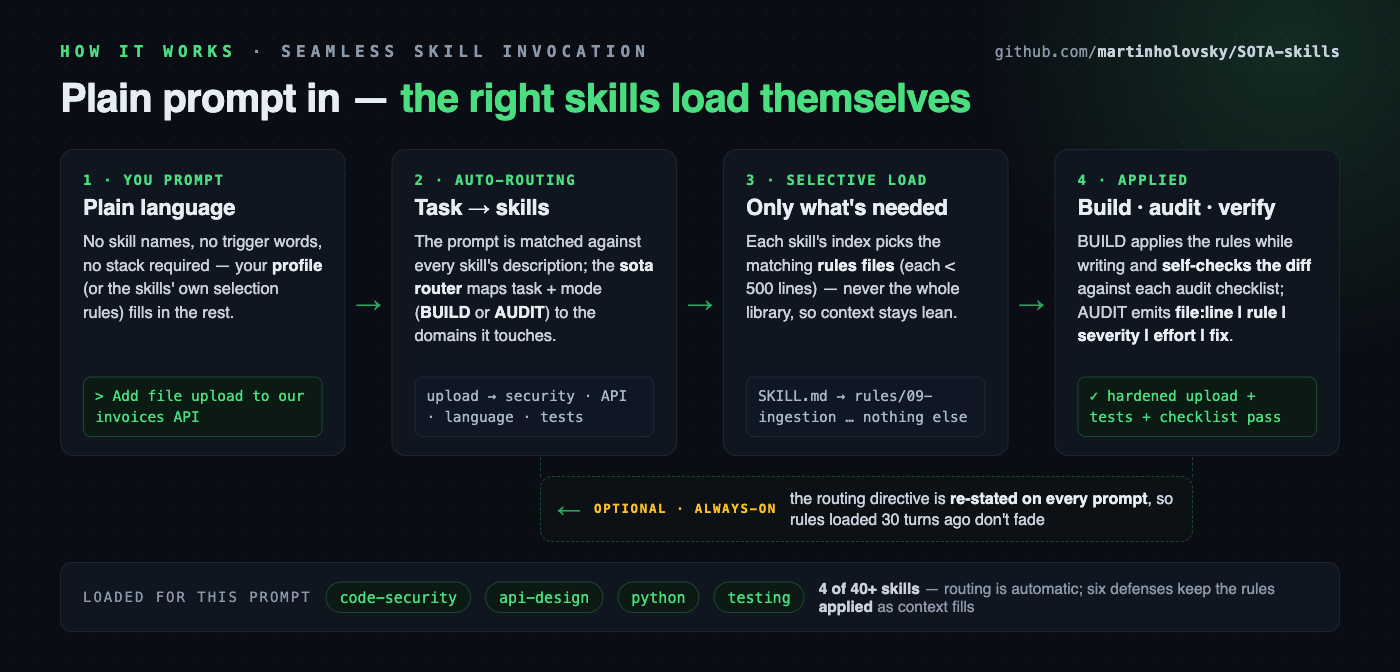
Claude Code matches your prompt against each skill's frontmatter description
and loads what's relevant automatically — you don't have to name a skill.
Naming one (or the sota router) just makes the routing explicit. From there:
- The skill's
SKILL.mdloads first (workflows, severity conventions, an index of itsrules/files). Only the rules files matching your task are read — never the whole library. - BUILD mode applies the rules while writing code and self-checks the diff against each loaded rules file's Audit checklist before presenting it.
- AUDIT mode hunts violations and reports findings as
file:line | rule | severity | effort | fix. A full audit runs seven passes: recon → threat model → per-domain passes → silent-control pass (does each control confirmed to exist actually do anything?) → decision-ledger review → findings → refute before reporting. Scoping, evidence standard, severity model and report structure come fromsota/rules/01-audit-methodology.md; the report ends in a roadmap sequenced by risk-reduction-per-effort. - If
profiles/<you>.mdexists, its stack choices are BUILD defaults and the AUDIT baseline (deviations get flagged).
Conventions
- Every rules file ends with an Audit checklist (yes/no questions, often with grep/lint patterns to hunt violations).
- Severity scale everywhere: Critical (exploitable/data loss) · High (fix this sprint) · Medium (bounded impact) · Low (hygiene) · Info (observations, no direct risk). Each finding also carries an effort estimate (trivial/small/medium/large) so remediation can be sequenced by risk-reduction-per-effort.
- Each SKILL.md carries a top-10 non-negotiables list — apply these unconditionally; load detailed rules files only as the task demands.
- Borderline severities state the deciding assumption; unconfirmed findings are marked "needs verification", never asserted.
- A negative claim needs more proof than a positive one. "No instances of X" and "I only looked one way" are indistinguishable from the outside, so an absence claim requires a widened search plus a second independent method, and the search actually run is stated.
- A positive observation must show effect, not existence — the request it rejected, the log line it emitted, the test that fails when it's disabled. An inert control praised as a strength is the worst reporting error available.
- Publishing under someone else's name raises the evidence bar. A finding for the person who asked is cheap to retract; the same claim posted as them — a pull request review comment, an issue, a commit message upstream — is public, attributed and permanent. Verify by execution rather than inference, say what you did not test, and never publish on someone's behalf without their approval of the final text.
Found a gap? Tell us — it's the only signal we get
This library has no telemetry. Nothing reports back, by design. That also means a wrong rule, a stale version claim, or a task with no owning skill stays in the library for everyone until a human says so.
If a skill was wrong, outdated, or missing when you needed it: open an issue (bad-guidance / skill-request templates — both take about a minute). Dangerous or security-sensitive guidance goes to a private advisory instead.
The assistant will usually flag these itself: the router tells it to surface a one-line note when the library lets you down, rather than papering over it.
If it saved you time, a ⭐ helps other engineers find it.
Contributing
See CONTRIBUTING.md. The short version: keep skills generic,
verify fast-moving claims against primary sources, keep skill files
(skills/**) ≤ 500 lines — that cap keeps incremental rule loading working and
does not apply to README/CHANGELOG/docs/, which are read by humans — and end
each rules file with an audit checklist. Fourteen invariants enforce this in
scripts/check-invariants.sh (pre-commit + CI), covering line caps, checklist
placement, description limits, version and count drift, router completeness,
internal link resolution, every rules file being reachable from its skill's index,
a single [Unreleased] CHANGELOG entry, the LAST-VERIFIED stamp moving only
with a sweep, a rendered assets/*.png never being older than the *.html it
comes from, every scoreboard row declaring its sample size, and a release
declaring the front door terms its new capabilities landed on — plus gitleaks
(full-history scan in CI; per-commit via the pre-commit hook). Ideas taken from outside the repo are recorded with a
verdict and reason in docs/ADOPTION-LOG.md, so a
rejection isn't re-litigated. Security issues and conduct:
SECURITY.md, CODE_OF_CONDUCT.md.
License
© 2026 Martin Holovsky. Licensed under CC BY 4.0 — Creative Commons Attribution 4.0 International. Use, adapt, and share freely (including commercially); just give attribution: "SOTA Engineering Skills by Martin Holovsky, CC BY 4.0."
profiles/ holds personal stack profiles and is git-ignored except
profiles/example.md.template — copy that to profiles/<you>.md and edit it;
your real profile stays local and is never committed.


