

GeoSpoof
Your VPN changes your IP address. Your device is still telling websites where you actually are.







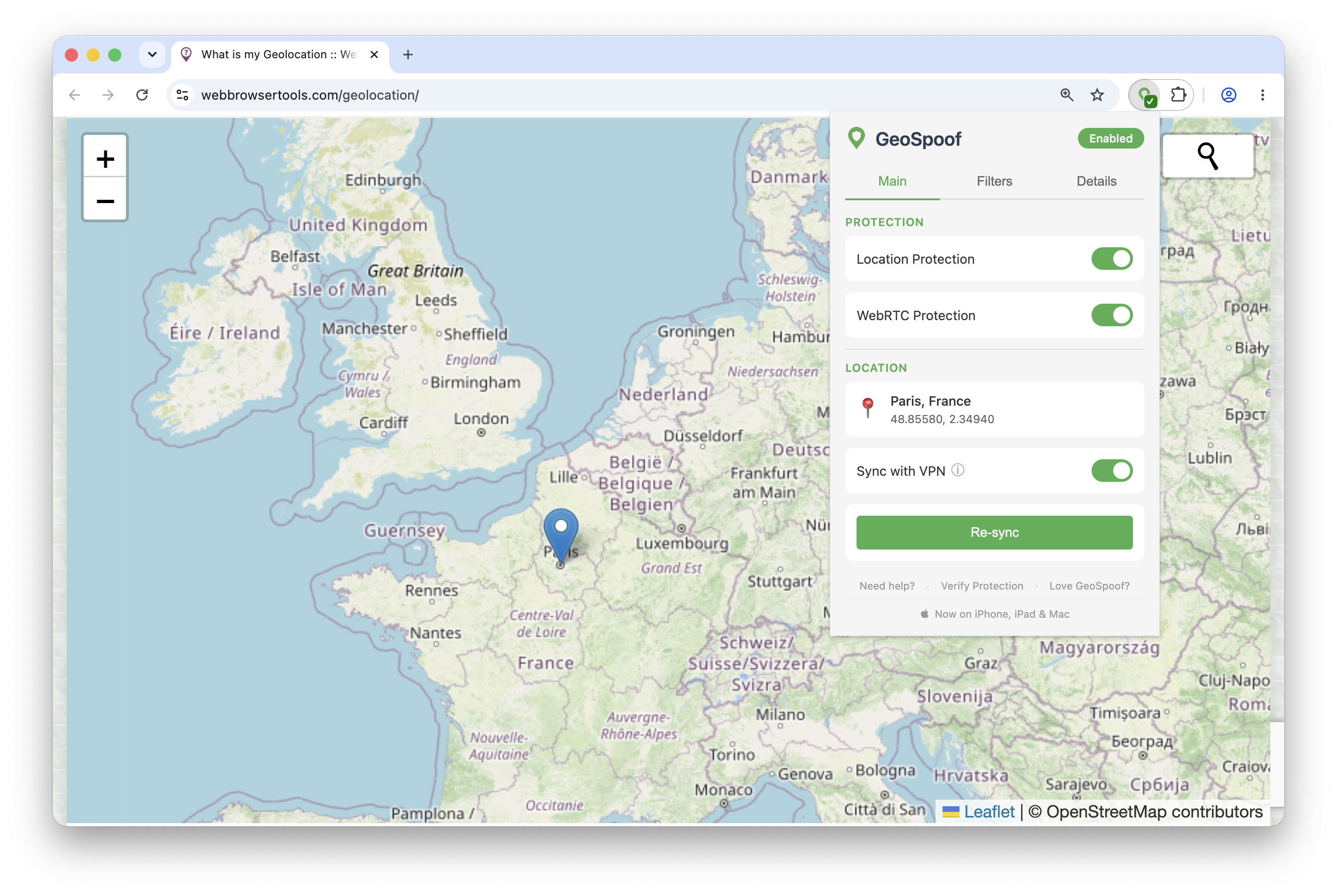
GeoSpoof now comes in two parts:
- Browser extension (free & open source) — stops websites from geolocating you by overriding the Geolocation API, timezone,
Intl, WebRTC, and every other signal, so your browser reports a location you choose. Firefox, Chrome, and Safari. - GeoSpoof GPS — moves your iPhone or iPad's real, system-level GPS to the location you pick, so location-aware apps across the whole device match it, not just the browser.
Contents
- Getting started — Install · Usage
- Why GeoSpoof? — What it does NOT do
- Reported Language — opt-in language & locale alignment
- GeoSpoof GPS — device-level location on iPhone & iPad
- Overridden APIs
- External Services
- Featured in
- Development
Getting started
Install
| Browser | Store | Works on |
|---|---|---|
 |
Firefox Add-ons | Firefox 140+ on desktop and Android |
 |
Chrome Web Store | Chrome, Brave, Edge, Opera, and other Chromium browsers |
 |
App Store | Safari on iOS, iPadOS, and macOS |
 |
GitHub Releases | Firefox self-hosted signed XPI — setup below |
Safari setup — enabling after install
After installing on Safari, tap the puzzle piece icon (or go to Safari Settings → Extensions) and enable GeoSpoof for the sites you want to protect. On iOS/iPadOS, you can also enable it per-site from the AA menu in the address bar.
Other install paths — self-hosted XPI, from source
From GitHub Releases (Firefox self-hosted)
Each release includes a self-hosted signed XPI alongside the AMO submission. The self-hosted XPI uses a 4-segment version (e.g., 1.18.0.42) to avoid collisions with the AMO listing.
- Go to the Releases page
- Download
geospoof-firefox-v<version>-signed.xpifrom the latest release - In Firefox, open
about:addons - Click the gear icon (⚙) and select Install Add-on From File…
- Select the downloaded
.xpifile
The signed XPI works on standard Firefox with no extra configuration. Once installed, Firefox automatically checks for and installs new versions via the self-hosted update manifest. If you later install from AMO, Firefox will auto-upgrade to it since AMO releases use a higher base version.
Note: An unsigned
geospoof-firefox-v<version>-unsigned.xpiis also included in each release for Firefox forks that don't support AMO signatures. Most users should use the signed version.
From source
See CONTRIBUTING.md for build instructions.
Usage
- Click the GeoSpoof icon in your toolbar
- Search for a city, enter coordinates manually, or use "Sync with VPN" to auto-detect your VPN exit region
- Enable "Location Protection", "WebRTC Protection", and "Sync with VPN" features
- Refresh open tabs to apply
- Confirm it's working at geospoof.com/verify
See docs/USER_GUIDE.md for details.
Why GeoSpoof?
A VPN changes your IP, but your browser still leaks your real location through the Geolocation API, timezone offsets, Intl.DateTimeFormat, WebRTC, and more. Sites cross-reference these signals against your IP — when they don't match, you're flagged.
GeoSpoof overrides every one of those channels so your browser reports a consistent, chosen location instead of your real one. Set it to match your VPN, mismatch it on purpose, or pick anywhere in the world.
- VPN Region Sync — detects your VPN exit IP and sets your location to match. One click, and it re-syncs automatically as you switch exit servers.
- Manual control — search for a city or enter coordinates directly.
- Full signal alignment — geolocation, timezone, Date APIs, Intl, Temporal, and WebRTC all report the same place.
- Reported Language (opt-in) — optionally report a language to match, so
navigator.language, everyIntlformat, and theAccept-Languageheader agree instead of announcing where you actually come from. - Anti-fingerprinting — overrides are disguised to pass native code checks used by real-world fingerprinting scripts.
- Cross-browser — Firefox, Chrome, Brave, Edge, and Safari. Single codebase, MV3.
Note: Use of this tool may violate the Terms of Service of certain websites. Use responsibly.
What This Does NOT Do
GeoSpoof is designed to work alongside a VPN, not replace one.
- Does NOT spoof your IP address (use a VPN for that)
- Does NOT change your browser's language by default — that's opt-in (see Reported Language), and it does NOT change GeoSpoof's own interface language
- Does NOT bypass server-side detection (IP, payment info, account history)
- Does NOT track your browsing activity, collect telemetry, or store data on external servers. Some features (city search, VPN sync) call third-party APIs to function. See the Privacy Policy for exactly what's sent and to whom.
- Does NOT provide forensic-level anti-fingerprinting. Engine-level API tampering is also detectable by dedicated tools. For extreme threat models, use Tor Browser or Mullvad Browser instead.
Reported Language (opt-in)
Your VPN and your spoofed location can say Paris while your browser still says navigator.language === "en-US" and sends Accept-Language: en-US with every request. Reported Language closes that gap.
Turn it on in Settings (the ⚙ gear in the popup header) → Reported Language and pick either:
- Match my location — use the dominant language of the place you're already spoofing, resolved offline from your spoofed timezone.
- Choose language… — name any language tag your browser supports, like
fr-FR,ja, orpt-BR. The field suggests common ones as you type but accepts any valid tag.
It's off by default, because it visibly changes browsing: many sites will switch language outright.
When it's on, these move together:
navigator.languageandnavigator.languages, in the page and inside Workers- The default locale of every
Intlconstructor, plus eachresolvedOptions() toLocaleStringonDate/Number/BigInt/Array,localeCompare, and locale-sensitive case mapping- The
Accept-Languagerequest header
They move together on purpose. A browser claiming fr-FR in script while sending Accept-Language: en-US is obviously tampered with — a stronger fingerprint than not spoofing at all — so both surfaces are derived from one resolver and can't disagree. Formats aren't faked either: the chosen locale is handed to the browser's own Intl engine, so separators, month names, collation order, and hour cycle are genuinely correct for the language you report.
Limits, stated plainly:
- Locale entropy outside an extension's reach is not covered: installed fonts, text-rendering metrics, and
speechSynthesisvoice lists still reflect your real system. - What's advertised is shaped per engine to match what that browser natively sends — Firefox and Chromium expose the tag plus a bare-language fallback with different quality values, and Safari exposes a single language — so the output doesn't look like a different browser's.
- The
Accept-Languageheader is rewritten on Firefox and Chromium. On Safari it depends on the engine honoringdeclarativeNetRequestheader modification, which has historically been unreliable; where it doesn't, coverage degrades to the JavaScript surfaces only. - If you pick a language your browser has no data for, GeoSpoof reports your real one rather than half-applying the change — the control tells you when that happens.
This is separate from the Language setting further down the same panel, which only changes GeoSpoof's own interface language and is never sent to websites.
GeoSpoof GPS (device-level location)
The browser extension keeps your browser private. GeoSpoof GPS goes a level deeper: it moves your iPhone or iPad's real, system-level GPS to the location you choose, so location-aware apps across the whole device match it — not just Safari.
- Whole-device, not just the browser — sets the OS-level location every app reads, driven from a companion app for Mac.
- Secure one-time pairing — set up from your Mac over a secure pairing. No jailbreak.
- Fully reversible — reverts to your real GPS the moment you turn it off.
- Private by design — same no-account, no-tracking stance as the extension. Built for privacy and for testing location-based features; not designed for AR games.
GeoSpoof GPS is an optional Pro feature — browser and Safari spoofing stay free. It ships as a signed, notarized macOS app.
Download it at geospoof.com/gps.
GeoSpoof GPS is a separate, closed-source product and is not part of this repository — this repo is the open-source browser extension. See the Privacy Policy for exactly what each surface sends and to whom.
Overridden APIs
When protection is enabled, GeoSpoof overrides browser APIs synchronously at document_start before any page JavaScript runs. Covered APIs include:
- Geolocation —
navigator.geolocation.getCurrentPosition/watchPosition,navigator.permissions.query - Date & Timezone —
Dateconstructor,Date.parse, allDate.prototypegetters and formatters,getTimezoneOffset - Intl —
Intl.DateTimeFormatconstructor andresolvedOptions - Temporal —
Temporal.Now.*(feature-detected) - XSLT / EXSLT —
XSLTProcessor.prototype.transformToFragment/transformToDocumentrewrite EXSLTdate:date-time()output (Firefox, where available) - Workers —
Worker,SharedWorker, andnavigator.serviceWorker.registerwrapped to propagate the spoofed timezone into worker scopes (URL-based worker coverage is the FirefoxwebRequest.filterResponseDatapath; inline/blob workers are covered on every engine) - WebRTC — via browser privacy API, no script injection needed
- Locale (opt-in, see Reported Language) —
navigator.language,navigator.languages, the default locale of everyIntlconstructor (DateTimeFormat,NumberFormat,Collator,RelativeTimeFormat,ListFormat,PluralRules,DisplayNames,Segmenter,DurationFormat) plus theirresolvedOptions(),toLocaleStringonDate/Number/BigInt/Array,String.prototype.localeCompare/toLocaleUpperCase/toLocaleLowerCase, and theAccept-Languagerequest header - Anti-fingerprinting —
Function.prototype.toStringreturns[native code]for all overrides; iframes patched on insertion - Engine-level Spoofing (Chrome/Chromium, opt-in) — an optional mode that drives the timezone override through the Chrome DevTools Protocol (
chrome.debugger→Emulation.setTimezoneOverride) instead of page-world injection. It covers background/module/service workers and applies before a page's first script, closing the worker and cold-start timezone leaks the content-script path can't reach on Chromium MV3. Off by default; while on, Chrome shows a "started debugging this browser" notice. Geolocation stays on the injected path.
For the full API reference, see docs/API.md. For the VPN sync and auto-resync architecture, see docs/VPN_SYNC.md.
External Services
GeoSpoof runs no backend application and sends no data to the developer for collection or analytics. Some features — city search and the optional "Sync with VPN" — make requests directly from your device to third-party services. Timezone resolution downloads boundary data from the developer's own CDN (cdn.geospoof.com, hosted on AWS), which transmits your IP as part of that request. The developer does not use these requests for analytics, tracking, profiling, advertising, or user accounts, and stores no personal data from them. Exactly what is sent, when, and to whom (for both the Safari extension and the companion apps) is documented in the Privacy Policy.
Featured in
- Privacy Guides community forum — "GeoSpoof: a Firefox add-on for convenient geolocation privacy"
- Korben — "GeoSpoof - Le VPN cache votre IP mais le navigateur vous trahit" (FR)
Development
See CONTRIBUTING.md for setup, scripts, testing, and the release pipeline.
Legal
Using location spoofing may violate terms of service of streaming, financial, or e-commerce platforms. You are responsible for compliance. See PRIVACY_POLICY.md for full details.
License
The GeoSpoof browser extension and everything in this repository is open source (MIT) — see LICENSE. Use, modify, and redistribute freely, including commercially.
The native GeoSpoof GPS desktop core (the Rust/Swift device product) is developed separately as a closed-source product and is not part of this repository.
Trademarks: The MIT license covers the source code only, not the brand. GeoSpoof™ is a trademark of GeoSpoof LLC. You're free to use and fork the code under MIT, but the GeoSpoof name and logo aren't licensed with it — please don't brand a fork or derivative product as "GeoSpoof" in a way that could confuse users about its source.
Links
- Website — geospoof.com
- GeoSpoof GPS — geospoof.com/gps
- Verify your protection — geospoof.com/verify
- Community — r/GeoSpoof
- User Guide
- API Documentation
- VPN Sync & Auto-Resync
- How Browsers Track Location
- Privacy Policy
- Contributing
- Report Issues
- Buy me a coffee
Star History
Acknowledgments
- Nominatim for geocoding
- browser-geo-tz for timezone boundary-data lookup
- BrowserLeaks for testing tools
- arkenfox TZP for timezone/geolocation fingerprint testing
- CreepJS for fingerprint testing
- webbrowsertools for testing tools
Contributors
Thanks to everyone who has contributed to GeoSpoof.


