

Sing any YouTube song. Get scored in real-time.
Frank Karaoke wraps YouTube with a real-time singing scoring overlay. Search for any song on YouTube, sing along, and see your score update live. No pre-made song files needed — the app analyzes the video's audio and your voice simultaneously using pitch detection and signal processing.
Built with Flutter for Android.
Screenshots
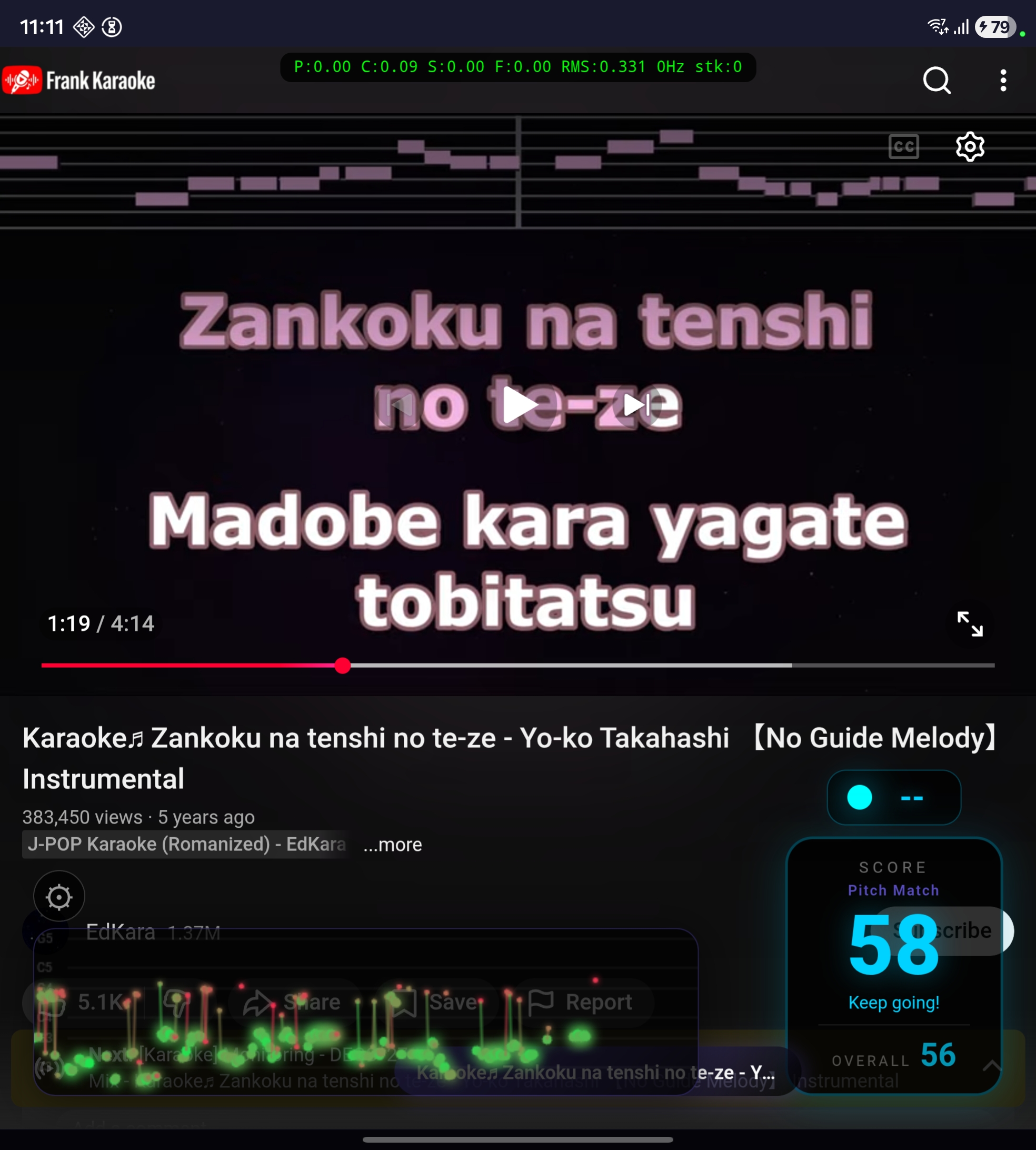
Real-time scoring overlay on top of a YouTube karaoke video. The pitch trail (bottom left) shows your singing in green dots, the score (bottom right) updates live, and the current note is displayed at top right.
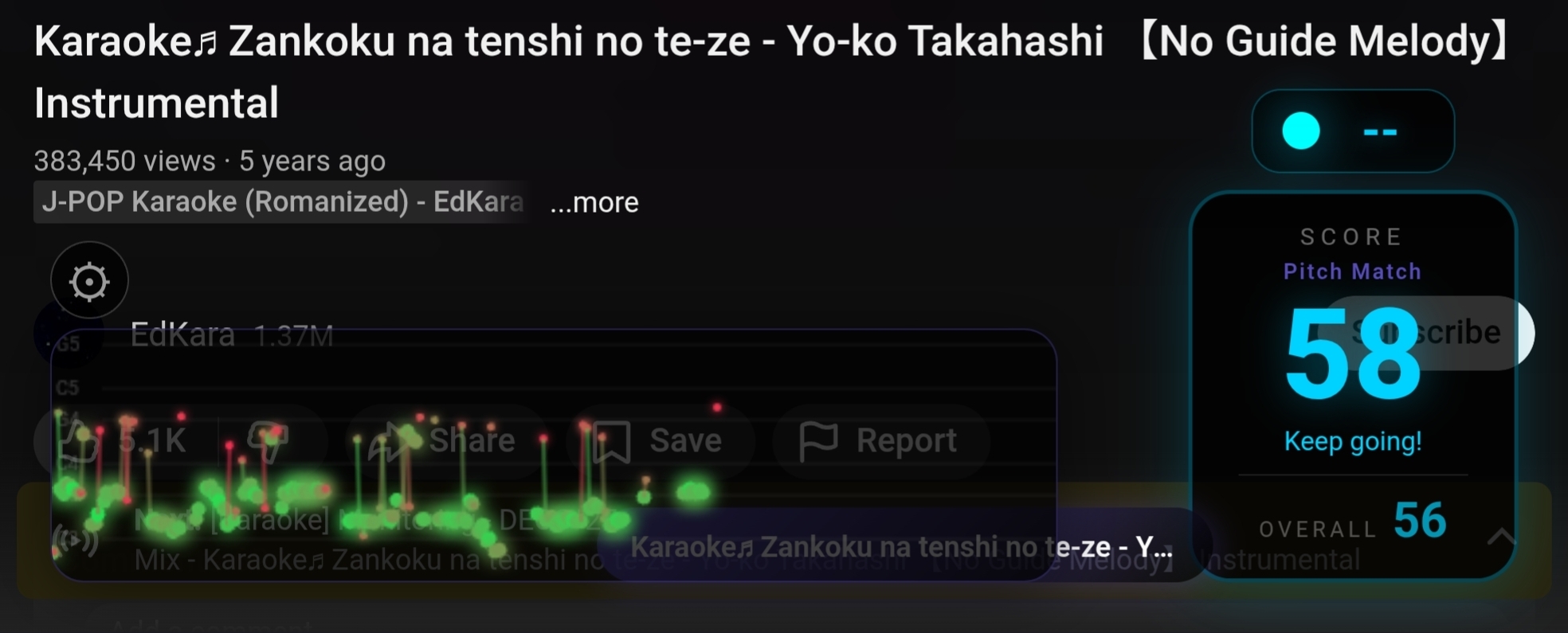
Detailed view of the scoring interface: live score with feedback text, overall score for the entire song, pitch trail canvas with note grid markers (C3-G5), and the gear icon for settings.
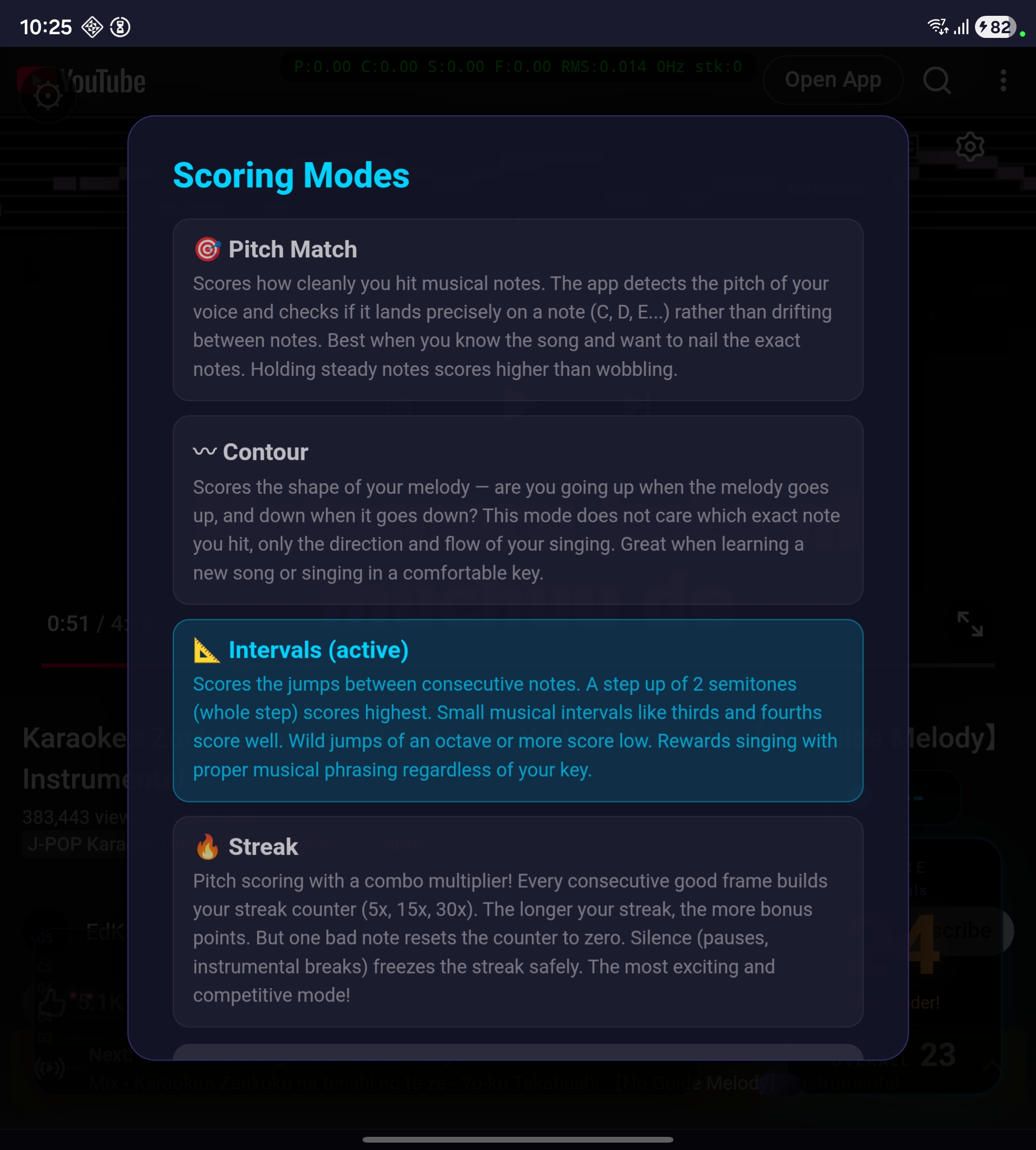
Tap the score box to choose between 4 scoring modes. Each mode evaluates your singing differently — from precise pitch matching to combo-based streak scoring.
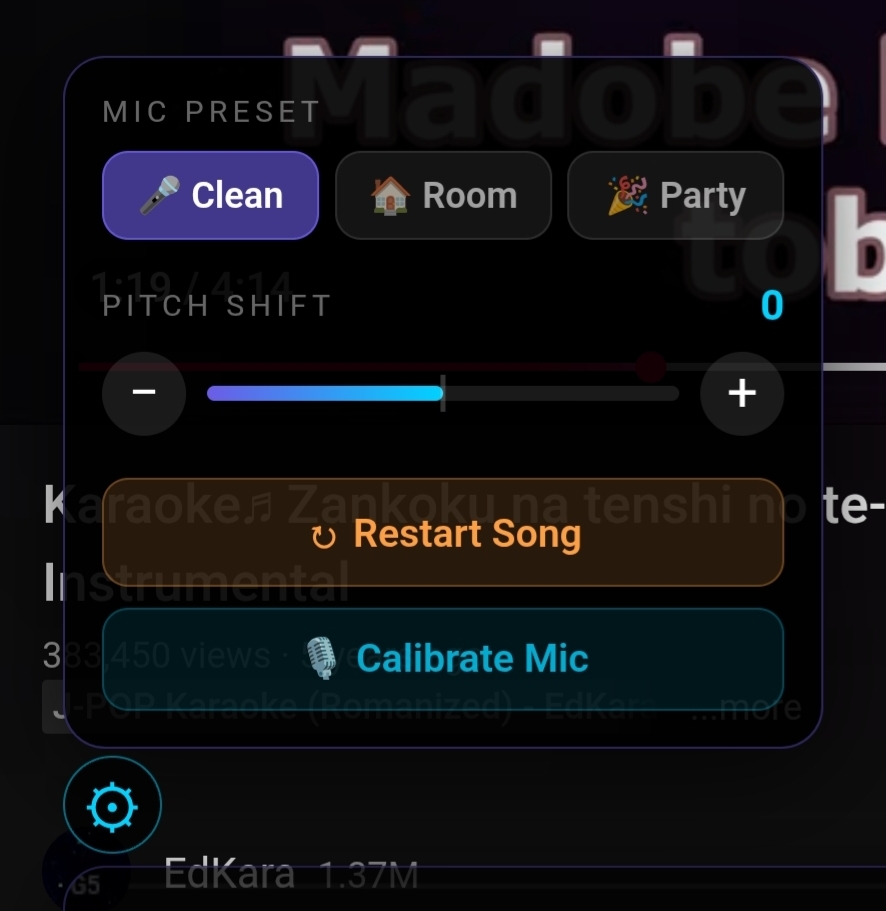
Settings panel: choose a mic preset for your environment (clean external mic, room mic, or noisy party), adjust pitch shift for songs outside your vocal range, restart the song, or calibrate the mic for your room's noise level.
Pitch Shift
Songs too high or too low for your voice? Use the pitch shift controls in the settings panel to transpose the music up or down by up to 6 semitones. The YouTube video's audio pitch changes in real-time, and the scoring automatically adjusts to match — so you sing in your comfortable range and still get scored correctly.
Under the hood, this uses the HTML5 video element's playbackRate with preservesPitch=false. Small pitch changes (±2-3 semitones) have a barely noticeable speed difference (~6% per semitone).
How It Works
- Open the app — YouTube loads inside the app with the Frank Karaoke logo
- Search for a karaoke video — any YouTube video works, but instrumental karaoke tracks give the best results
- Video pauses for setup — the app briefly pauses playback to initialize the mic, download song data for the pitch oracle, and prepare the scoring overlay
- Sing along — the video plays and your score updates in real-time based on your microphone input
- See your results — the live score reflects your current performance, while the overall score tracks the entire song
- Play the same song again — the pitch oracle data is cached locally, so repeat plays start instantly with no download
The app injects an HTML/CSS overlay directly into the YouTube page via JavaScript — the scoring display, pitch trail, settings panel, and mode selector are all rendered inside the webview.
Scoring: An Honest Explanation
Why scoring is approximate
Traditional karaoke machines (SingStar, Joysound, DAM) ship with pre-made melody reference files for every song — they know exactly which note you should be singing at every moment. Frank Karaoke doesn't have that. Instead, it works with any YouTube video by analyzing the audio in real-time.
This means:
- Without the pitch oracle (when the reference audio download fails or times out), the app can only judge how you sing (pitch stability, melodic movement, interval quality), not what you should be singing. It can't tell if you're singing the right melody for this specific song.
- With the pitch oracle (when the reference audio downloads successfully), the app knows what the music sounds like at every moment. It compares your voice's pitch against the reference to distinguish your singing from speaker bleed — if the mic detects the same pitch as the music, it's the speaker, not you. The first play of a song takes a few seconds to analyze; after that, the data is cached locally and loads instantly on repeat plays.
- The phone mic challenge: On Android with the built-in mic, the microphone captures your voice plus the music playing from the speaker. The app uses three layers of filtering: (1) adaptive RMS baseline calibrated from the instrumental intro to distinguish voice from speaker volume, (2) a 200-3500 Hz bandpass filter to reduce instrumental bleed, and (3) pitch oracle comparison to identify speaker bleed by matching detected pitch against the reference audio.
For detailed technical background, see docs/scoring.md.
The 4 Scoring Modes
Each mode evaluates a different aspect of singing quality. Tap the score box during playback to switch modes.
🎯 Pitch Match
Best for: Songs you know well
Scores how cleanly you hit musical notes. The app detects your pitch and checks if it lands precisely on a note (C, D, E...) rather than drifting between notes. Holding steady notes scores higher than wobbling. Uses the YIN algorithm for pitch detection with a bandpass filter to isolate vocal frequencies.
〰️ Contour
Best for: Learning new songs
Scores the shape of your melody — are you going up when the melody goes up, and down when it goes down? This mode doesn't care which exact note you hit, only the direction and flow of your singing. Measures pitch range and significant melodic movement over a rolling window.
📐 Intervals
Best for: Singing in a different key
Scores the jumps between consecutive notes. A step of 2 semitones (whole step) scores highest. Small musical intervals like thirds and fourths score well. Wild jumps of an octave or more score low. Rewards proper musical phrasing regardless of which key you're singing in. Uses a Gaussian scoring curve centered at the whole step.
🔥 Streak
Best for: Parties and competition
Pitch scoring with a combo multiplier. Every consecutive good frame builds your streak counter (5x, 15x, 30x ON FIRE!). The longer the streak, the more bonus points. One bad note resets the counter to zero. Silence during instrumental breaks freezes the streak safely. The most dynamic and exciting mode.
Why these scoring systems?
The choice is based on research from academic papers on singing assessment (Nakano et al. 2006, Tsai & Lee 2012) and analysis of how professional karaoke systems work. Without per-song reference data, these four approaches cover the main dimensions of vocal quality that can be measured from audio alone:
- Intonation (Pitch Match) — are you in tune?
- Melodic shape (Contour) — are you following the melody?
- Phrasing (Intervals) — are your note transitions musical?
- Consistency (Streak) — can you sustain quality over time?
Each produces genuinely different scores for the same performance, giving users variety and the ability to choose what matters most to them.
Technical Stack
- Flutter — Android (primary target)
- Riverpod — state management
- webview_flutter — YouTube embedding
- youtube_explode_dart — audio stream extraction for the pitch oracle
- record — microphone PCM capture
- audio_decoder — reference audio decoding (Android MediaCodec)
- YIN algorithm — pitch detection (pure Dart implementation)
- Bandpass filter — 200-3500 Hz IIR filter for vocal isolation
Building Locally
Prerequisites
- Flutter SDK (3.10+)
- Android SDK with a device or emulator (API 24+)
- A physical Android device is recommended for mic testing
Build and install
# Clone the repository
git clone <repo-url>
cd frank_karaoke

# Get dependencies
flutter pub get

# Run on a connected Android device
flutter run -d <device_id>

# Or build a debug APK for sideloading
flutter build apk --debug

# The APK will be at:
# build/app/outputs/flutter-apk/app-debug.apk
Sideload the APK
- Transfer
app-debug.apkto your Android device - On the device, open the file and tap Install
- You may need to enable "Install from unknown sources" in Settings > Security
- Grant microphone permission when prompted on first use
First use
- The welcome screen explains the app and scoring modes
- Tap the gear icon to open settings — calibrate your mic before singing (it takes 3 seconds and adapts to your room's noise level)
- Search for a karaoke video and play it
- Tap the score box to choose your preferred scoring mode
- Sing!
Project Structure
lib/
  core/           # constants, audio presets, scoring modes, logo assets
  features/
    audio/        # mic capture, pitch detection, bandpass filter, voice isolation, pitch oracle
    scoring/      # scoring engine, scoring session (multi-mode)
    overlay/      # HTML/CSS/JS overlay injected into YouTube webview
    youtube/      # webview, audio extraction, URL parser
  state/          # Riverpod providers
  ui/             # screens, theme
docs/
  IDEA.md         # original product vision
  scoring.md      # comprehensive scoring research and architecture
  screenshots/    # app screenshots
Research
The scoring system is based on published research in singing assessment. See docs/scoring.md for the full analysis covering:
- How SingStar, Joysound, and DAM karaoke machines score singing
- Academic papers on reference-free vocal quality assessment
- The pitch oracle architecture for speaker bleed detection
- Voice isolation challenges on Android's built-in mic
- Latency and sync considerations for Bluetooth speakers
- The implementation roadmap from current state to UltraSinger integration
License
This project is for personal and educational use.


