

eslint-plugin-ai-guard
🛡️ GitHub-native guardrails for AI-generated code.


What is ai-guard?
ai-guard is an ESLint plugin and GitHub Action that catches reliability and security bugs specific to AI-generated code — the patterns Copilot, Claude, Cursor, and Gemini consistently get wrong.
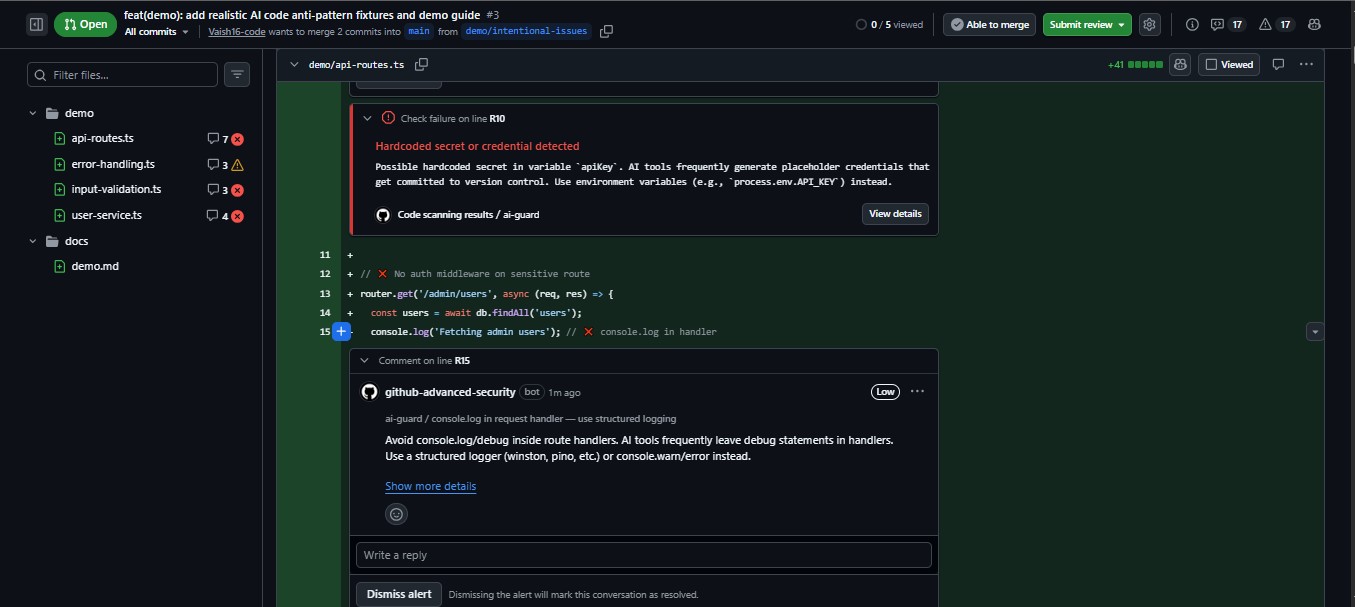
It integrates directly into GitHub pull request workflows: blocking dangerous merges, generating SARIF reports for GitHub Code Scanning, and posting inline PR annotations at the exact line where the bug lives.
# Scan immediately — no config needed
npx ai-guard run

# PR-aware changed-only scan with GitHub Advanced Security
npx ai-guard changed --sarif --sarif-output results.sarif
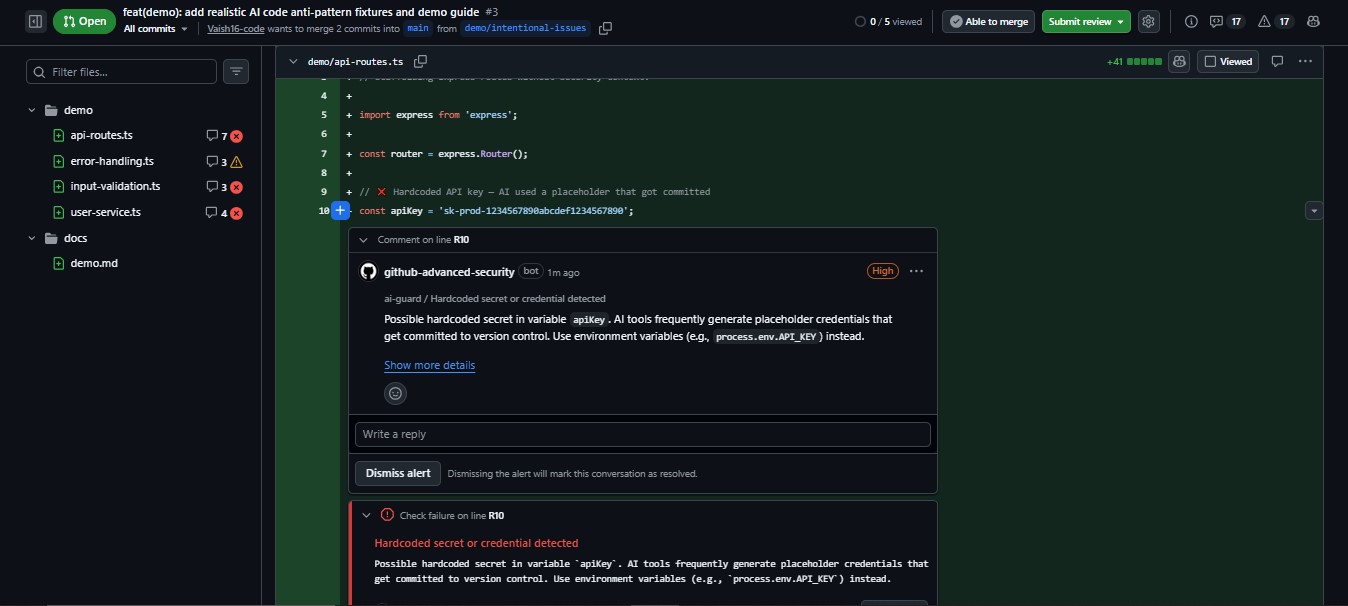
The Problem
AI coding assistants generate code that looks correct but isn't. The patterns they get wrong are consistent, predictable, and existing linters don't catch them:
| Pattern | Why AI Gets It Wrong |
|---|---|
try {} catch (e) {} |
AI adds catch blocks without handling the error |
array.map(async ...) |
AI generates async callbacks returning Promise[], not values |
fetch(url) without await |
AI forgets to await or handle promise rejection |
const apiKey = 'sk-...' |
AI uses placeholder credentials that get committed |
eval(userInput) |
AI generates dynamic evaluation without security context |
if (true) { ... } |
AI leaves dead scaffolding branches in generated code |
ai-guard is purpose-built to catch what AI tools consistently get wrong — before those bugs reach production.
Install
npm install --save-dev eslint-plugin-ai-guard
Requirements: Node.js ≥ 18 · ESLint ≥ 8
Quick Start
# Zero-config project scan
npx ai-guard run

# Security-focused scan
npx ai-guard run --security

# Strict mode — all 18 rules at error
npx ai-guard run --strict

# Scan only changed files (PR-aware)
npx ai-guard changed --pr
No configuration required. ai-guard ships with a production-tuned recommended preset.
GitHub Actions Integration
Drop this into any repository to get PR validation, SARIF-based Code Scanning, and GitHub Advanced Security integration in under 5 minutes:
# .github/workflows/ai-guard.yml
name: AI Guard

on: [pull_request]

permissions:
  security-events: write
  contents: read

jobs:
  scan:
    runs-on: ubuntu-latest
    steps:
      - uses: actions/checkout@v4
        with:
          fetch-depth: 0  # Required for changed-file detection

      - uses: actions/setup-node@v4
        with:
          node-version: 20
          cache: 'npm'

      - run: npm ci

      - name: Scan changed files
        run: |
          npx ai-guard changed \
            --pr \
            --strict \
            --sarif \
            --sarif-output ai-guard-results.sarif \
            --fail-on high

      - name: Upload to GitHub Code Scanning
        uses: github/codeql-action/upload-sarif@v3
        if: always()
        with:
          sarif_file: ai-guard-results.sarif
          category: ai-guard
This produces:
- ✅ Inline PR annotations at the exact line of each finding
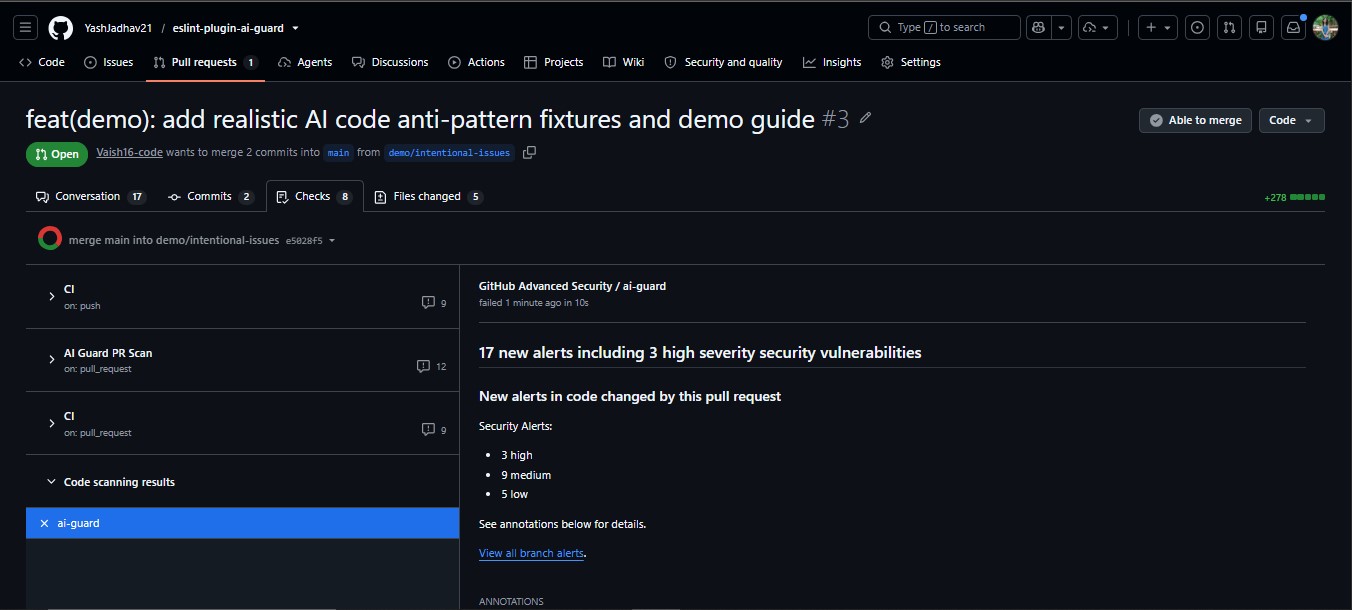
- ✅ GitHub Advanced Security summary ("17 new alerts including 3 high severity")
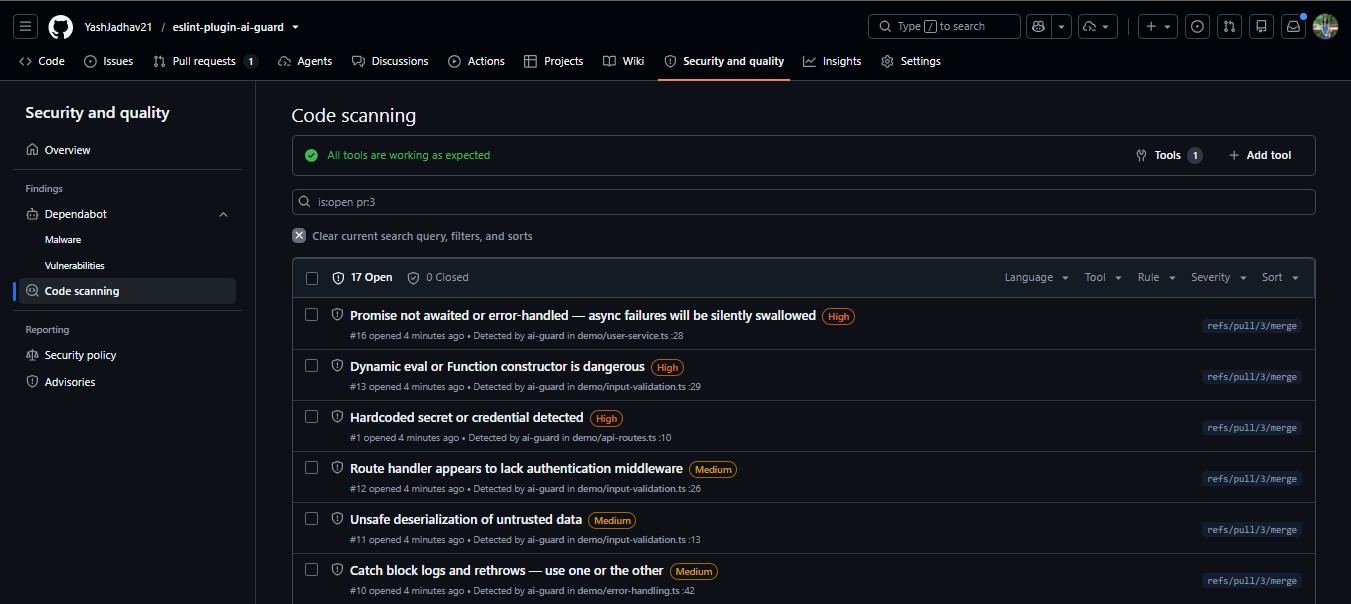
- ✅ Persistent alerts in
Security → Code scanning - ✅ PR status check that blocks merges on high-severity findings
Inline PR Annotations
GitHub Advanced Security Summary
GitHub Code Scanning Alerts
See docs/github-actions.md for the complete workflow reference
including full-scan mode, baseline mode, and SARIF debugging.
CLI Commands
| Command | Description |
|---|---|
ai-guard run |
Scan your project with the recommended preset |
ai-guard run --strict |
All 18 rules at error — for CI enforcement |
ai-guard run --security |
Security rules only |
ai-guard run --sarif |
Output SARIF for GitHub Code Scanning |
ai-guard run --json |
Output results as JSON (CI-friendly) |
ai-guard changed --pr |
Scan only files changed in this PR |
ai-guard changed --staged |
Scan only staged files (pre-commit hook) |
ai-guard init |
Auto-configure ESLint + workflow + agent context |
ai-guard init --yes |
Zero-prompt setup — recommended for CI/scripts |
ai-guard init-context |
Generate AI agent rules (CLAUDE.md, .cursorrules, etc.) |
ai-guard baseline |
Save current issues, track only new ones going forward |
ai-guard report |
Generate a shareable HTML report |
ai-guard doctor |
Diagnose your ESLint and ai-guard setup |
Fail Strategies
--fail-on errors   # Fail on any error-level finding (default)
--fail-on high     # Fail only on high-severity findings
--fail-on none     # Never fail — always continue
--max-warnings 0   # Fail on any warning
Example Output
  AI GUARD

  Files scanned:  142  ·  Issues in:  7 files  ·  Duration:  312ms  ·  Preset:  strict

  ── Summary by Category ──

  🔴  Security            3 errors
  🟠  Reliability         2 errors
  🟡  Async Stability     2 warnings

  Total: 5 errors · 2 warnings

  ── By Rule ──
    • no-hardcoded-secret: 3
    • no-empty-catch: 2
    • no-floating-promise: 2

  ── Next Steps ──
  ℹ  Run ai-guard baseline to save these issues and track only new ones
  ℹ  Run ai-guard report   to generate a shareable HTML report
Rules
🔴 Security
| Rule | Recommended | What it catches |
|---|---|---|
no-hardcoded-secret |
error | API keys, passwords, tokens in source. Autofix: process.env.* |
no-eval-dynamic |
error | eval() / new Function() with non-literal args |
no-sql-string-concat |
warn | SQL built by string concatenation — SQL injection risk |
no-unsafe-deserialize |
warn | JSON.parse(req.body) without validation |
require-auth-middleware |
warn | Express/Fastify routes without authentication middleware |
require-authz-check |
warn | Resource access without ownership checks |
🟠 Reliability
| Rule | Recommended | What it catches |
|---|---|---|
no-empty-catch |
error | catch (e) {} — errors silently vanish. Autofix: inserts TODO |
no-broad-exception |
warn | catch (e: any) that hides the real error type |
no-catch-log-rethrow |
off* | Catch blocks that only console.log + rethrow |
no-catch-without-use |
off* | Caught error variable never used |
🟡 Async Stability
| Rule | Recommended | What it catches |
|---|---|---|
no-floating-promise |
error | Async calls with no await, return, or .catch(). Autofix: adds void |
no-async-array-callback |
warn | array.map(async ...) — returns Promise[] not values |
no-await-in-loop |
warn | Sequential await in loops — use Promise.all |
no-async-without-await |
warn | async function that never uses await |
no-redundant-await |
off* | return await outside try/catch |
🔵 AI Patterns
| Rule | Recommended | What it catches |
|---|---|---|
no-dead-branch |
warn | if (true), if (false), x && !x — scaffolding leftovers |
no-duplicate-logic-block |
off* | Consecutive duplicate code blocks |
no-console-in-handler |
off* | console.log in route handlers — use a logger |
*Enabled at error in the strict preset.
Full rule documentation: docs/rules/
Presets
| Preset | Purpose | Best For |
|---|---|---|
recommended |
Critical issues at error, context-sensitive at warn |
All projects on day one |
strict |
All 18 rules at error |
CI enforcement in mature codebases |
security |
Security rules only | Security-focused scanning |
ESLint Flat Config
// eslint.config.mjs
import aiGuard from 'eslint-plugin-ai-guard';

export default [
  {
    plugins: { 'ai-guard': aiGuard },
    rules: { ...aiGuard.configs.recommended.rules },
  },
];
AI Agent Integration
Generate instruction files so Claude Code, Cursor, and GitHub Copilot automatically avoid the 18 most common AI-generated anti-patterns at generation time:
npx ai-guard init-context
This writes:
CLAUDE.md— loaded automatically by Claude Code.cursorrules— loaded automatically by Cursor.github/copilot-instructions.md— loaded automatically by GitHub Copilot
Your AI tools will avoid these patterns before you even run the linter.
See docs/ai-agents.md for the complete integration guide.
Real-World Example
// ❌ Typical AI-generated code — 4 issues in one function
async function processUserOrders(userId: string) {
  const apiKey = 'sk-prod-1234567890abcdef';  // no-hardcoded-secret

  const orders = await db.query(
    'SELECT * FROM orders WHERE id = ' + userId  // no-sql-string-concat
  );

  for (const order of orders) {
    await sendEmail(order.email);  // no-await-in-loop
  }

  updateAnalytics(userId);  // no-floating-promise
}

// ✅ After ai-guard fixes
async function processUserOrders(userId: string) {
  const apiKey = process.env.API_KEY;

  const orders = await db.query(
    'SELECT * FROM orders WHERE id = $1', [userId]
  );

  await Promise.all(orders.map(async (order) => sendEmail(order.email)));

  void updateAnalytics(userId);
}
Autofix Support
npx eslint src --fix
| Rule | What Gets Fixed |
|---|---|
no-hardcoded-secret |
Literal → process.env.VAR_NAME |
no-empty-catch |
Inserts /* TODO: handle error */ |
no-floating-promise |
Marks with void |
no-await-in-loop |
Rewrites simple loops to Promise.all(...) |
no-async-without-await |
Removes unnecessary async keyword |
Philosophy
- Precision over recall — we'd rather miss a bug than create noise
- Low false positives — a rule that fires on valid code goes to
warnor gets disabled - Gradual adoption —
recommendedis safe for day-one;strictis opt-in - Self-validating — ai-guard scans its own source in CI with the strict preset
- GitHub-native — SARIF output, Code Scanning, PR annotations are first-class features
Development
git clone https://github.com/ai-guard-dev/eslint-plugin-ai-guard.git
cd eslint-plugin-ai-guard
npm install
npm run test         # 678 tests across 39 test files
npm run build        # Build CJS + ESM bundles
npm run typecheck    # TypeScript strict check
npm run lint:self    # Scan own source with ai-guard
npm run lint:full    # Strict scan of src/ + cli/
See CONTRIBUTING.md for the full development guide.
Documentation
| Doc | Purpose |
|---|---|
docs/github-actions.md |
GitHub Actions workflow reference |
docs/ai-agents.md |
AI agent integration guide |
docs/architecture.md |
Architecture and internals |
docs/benchmarks.md |
Benchmarks vs ESLint, @typescript-eslint |
docs/rules/ |
Per-rule documentation |
CONTRIBUTING.md |
Contribution guide |
SECURITY.md |
Security policy |
CHANGELOG.md |
Release history |
ROADMAP.md |
Planned features |
FAQ
Is ai-guard a replacement for ESLint?
No. ai-guard runs on top of ESLint. It adds 18 rules specifically tuned for AI-generated code patterns. Your existing ESLint rules continue to work as normal.
Does ai-guard require TypeScript type information?
No. All rules use AST heuristics, not type analysis. This makes ai-guard faster than type-aware linters and zero-config for JavaScript projects. See benchmarks for performance comparison.
Will ai-guard slow down my CI?
Typically adds 1–2 seconds to a CI run. Changed-only mode (ai-guard changed --pr)
is even faster because it only scans files modified in the PR.
How do I reduce false positives?
Start with recommended preset (default). The strict preset enables all rules,
which may be noisy for some codebases. You can also:
- Use
ai-guard baselineto ignore pre-existing issues - Configure per-rule options (e.g.,
allowedLoggersforno-console-in-handler) - Use
// eslint-disable-next-line ai-guard/rule-namefor intentional overrides
Does ai-guard work with Copilot / Cursor / Claude Code?
Yes — in two ways:
- Lint after generation: ai-guard catches issues after AI generates code
- Prevent before generation:
ai-guard init-contextcreates instruction files (CLAUDE.md, .cursorrules) that teach AI agents to avoid these patterns
Troubleshooting
| Symptom | Fix |
|---|---|
Cannot find module 'eslint-plugin-ai-guard' |
Run npm install --save-dev eslint-plugin-ai-guard |
Config parse errors after init |
Run ai-guard doctor to diagnose |
| SARIF upload fails in GitHub Actions | Ensure permissions: security-events: write is set |
| Too many findings in strict mode | Switch to recommended preset or use ai-guard baseline |
Rules not firing on .ts files |
Install @typescript-eslint/parser |
ai-guard init skips workflow/context |
Use ai-guard init --yes for zero-prompt setup |
License
MIT — free forever. No rules behind a paywall.
Built to make AI-assisted development reliable and trustworthy. ⚡


