

Docstr-Health





docstr-health is a rich-powered CLI health score and visualization tool for Python docstrings.
Analyze the quality of any Python project's documentation — locally, from Git, or PyPI packages.
Preview
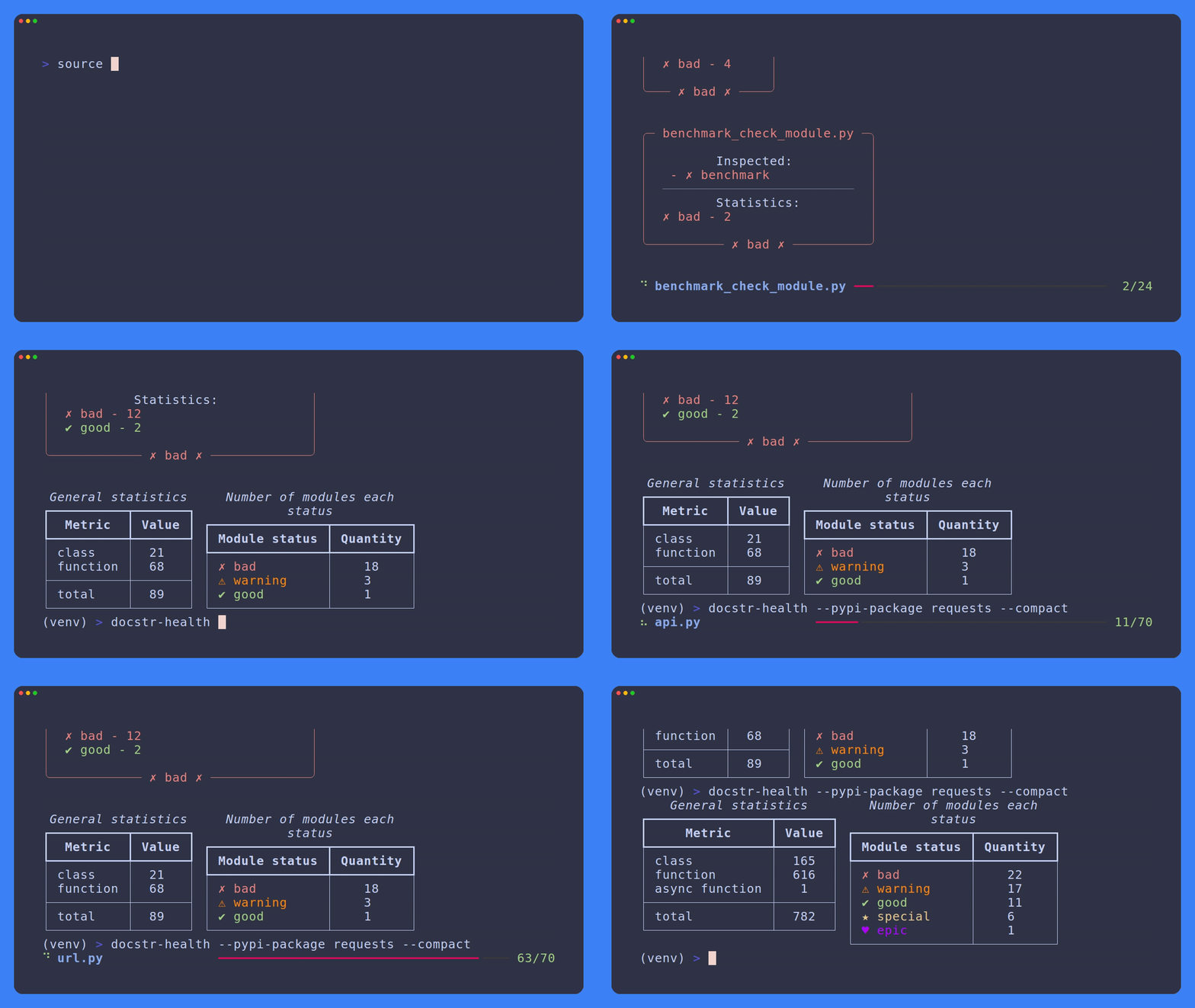
Table of Contents
- Features
- How It Compares
- Installation
- Usage
- Output
- Configuration
- Development
- Contributing
- License
- Acknowledgements
Features
- Local & remote scanning — works on local directories, Git repositories, and PyPI packages
- Docstring quality grading — each function gets a status:
good,special,epic,bad - Rich terminal UI — color-coded output with panels, tables, and progress bars
- Configurable rules — customize symbols, colors, and keyword requirements via
config.toml - Module-level statistics — per-module breakdown with overall project summary
- PEP 257 awareness — checks for Args, Returns, Raises, and other standard sections
- Async support — properly distinguishes sync/async functions
- Cache & no-cache modes — clone remote repos once or scan fresh every time
How It Compares
| Feature | docstr-health | pydoclint | darglint / darglint2 | interrogate | docstr_coverage |
|---|---|---|---|---|---|
| Scope | Docstring quality grading | Docstring correctness vs signature | Docstring correctness vs signature | Docstring coverage (%) | Docstring coverage (%) |
| Quality levels | ✅ bad → good → special → epic |
❌ Pass/fail only | ❌ Pass/fail only | ❌ Percentage only | ❌ Percentage only |
| Rich terminal UI | ✅ Rich panels, colors, symbols | ❌ Plain text | ❌ Plain text | ❌ ASCII table | ❌ Plain text |
| Remote scanning (Git / PyPI) | ✅ Built-in | ❌ | ❌ | ❌ | ❌ |
| Configurable rules | ✅ config.toml (symbols, colors, keywords) |
✅ CLI flags + config | ✅ .darglint config |
✅ pyproject.toml / setup.cfg |
✅ .docstr.yaml |
| Pre-commit hook | ❌ Planned | ✅ | ✅ | ✅ | ✅ |
| Performance | ✅ Fast (AST-based) | ⚡ Very fast | ❌ Slow (CYK parser) | ✅ Fast | ✅ Fast |
| Docstring styles | ✅ Google, Sphinx, NumPy | ✅ Google, Sphinx, NumPy | ✅ Google, Sphinx, NumPy | ❌ Coverage only | ❌ Coverage only |
| Signature validation | ❌ Planned | ✅ Checks args/returns/raises match code | ✅ Checks args/returns/raises match code | ❌ | ❌ |
| Coverage badge generation | ❌ Planned | ❌ | ❌ | ✅ SVG/PNG | ✅ SVG |
When to use docstr-health
- You want a quick visual health score for your project's documentation
- You need to scan remote repositories (Git, PyPI) without cloning manually
- You want color-coded terminal output with rich formatting
- You want to distinguish between "has a docstring" (good), "has parameter docs" (special), and "has full docs with returns/raises" (epic)
Installation
Using uv
uv pip install docstr-health
Using pip
pip install docstr-health
From source
git clone https://github.com/PurpleSwtr/docstr-health.git
cd docstr-health
uv venv
uv pip install .
Usage
Scan a local project
docstr-health /path/to/project
If no path is given, the current directory is used.
Scan a Git repository
docstr-health --repo-url https://github.com/user/repo.git
The repository is cloned into a cache directory and scanned automatically.
Scan a PyPI package
docstr-health --pypi-package requests
Downloads and scans the package from PyPI.
Compact mode
Display only the summary statistics without the per-function listing:
docstr-health --compact
Include module docstrings
Include __doc__ of the modules themselves in the analysis:
docstr-health --doc-modules
All flags
| Flag | Description |
|---|---|
--repo-url |
Scan a remote Git repository |
--pypi-package |
Scan a remote PyPI package |
--cache-dir |
Custom cache directory for remote repos |
--no-cache |
Do not cache remote repositories |
--compact |
Show only summary statistics |
--doc-modules |
Include module __doc__ strings |
--ignore-tests |
Skip test files and directories |
--version |
Show version and exit |
Output
Docstring statuses
| Status | Symbol | Meaning |
|---|---|---|
bad |
✗ | Missing or empty docstring |
good |
✓ | Docstring exists but only has a description |
special |
★ | Contains parameter docs (Args:,:param, Returns:, etc.) |
epic |
♥ | Contains advanced sections (Raises:, Examples:) |
Module statuses
The overall module status is computed from the individual function statuses:
- bad — all or most functions are undocumented
- warning — some functions are undocumented
- good — all functions documented, few special sections
- special — >50% of functions have parameter documentation
- epic — >50% of functions have advanced documentation (returns, raises, examples)
Configuration
Customize the behavior by editing config.toml inside the package, or fork the defaults.
Available options in [user_parameters]:
debug = false                  # Enable verbose logging
use_uv = true                  # Use uv instead of pip for PyPI downloads
excluded = [".venv", "__init__", "__pycache__"]
excluded_functions = ["wrapper"]

# Customize display symbols and colors
common_symbol = "●"
bad_symbol = "✗"
warning_symbol = "⚠"
good_symbol = "✔"
special_symbol = "★"
epic_symbol = "♥"
skipped_symbol ="…"

common_color = "white"
bad_color = "red"
warning_color = "dark_orange"
good_color = "green"
special_color = "yellow"
epic_color = "purple"
skipped_color ="gray"
Docstring requirement levels define which keywords trigger a special or epic status. By default requires_v4 is used.
Development
git clone https://github.com/PurpleSwtr/docstr-health.git
cd docstr-health
uv venv
uv sync --group dev
uv run docstr-health .
Run tests:
uv run pytest
Contributing
We welcome and appreciate all contributions!
Before you begin, please read Contributing Guide. It covers coding standards, branching strategy, and the Pull Request process.
License
Apache License 2.0 © Mihail Sergeenko. See LICENSE for details.
Acknowledgements
Built using just one library: Rich


